3D Printing Glossary: 50 Terms Explained in Plain English
3D printing has a vocabulary problem: half the words come from CAD, half come from machine shops, and a few were invented on forums at 2 a.m. This glossary defines the 50 terms you will actually run into, grouped by where you meet them — the file you export, the slicer settings that turn it into instructions, the plastic you choose, the machine that prints it, and the things that go wrong. Every definition is one or two lines, in plain English, with no assumed background.
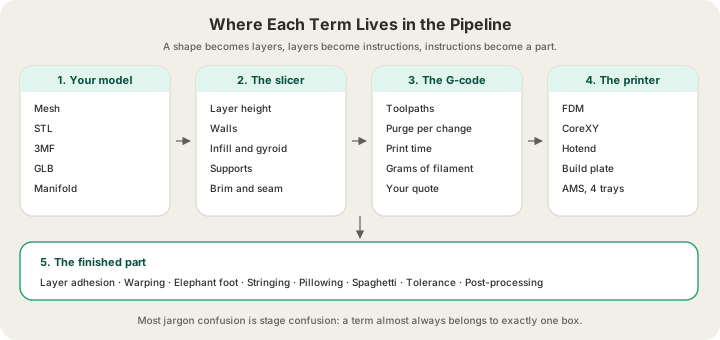
The single most useful thing to internalise before the list: a 3D print is a translation with four steps. A mesh describes a shape, a slicer converts that shape into layers, G-code tells a machine how to draw those layers, and the printer draws them. Almost every term below belongs to exactly one of those steps, and most confusion comes from applying a term from one step to another.
Files and Software (8 Terms)
| Term | In plain English |
|---|---|
| Mesh | A 3D shape described as a shell of flat triangles. Not a solid, not equations — just a surface that happens to enclose a volume. |
| STL | The oldest and most common print file. Triangles only: no colour, no units, no material. Universally supported and we accept it. |
| 3MF | The modern replacement for STL. Carries units, colours, materials and multiple parts in one file, so nothing gets lost in translation. |
| GLB | A binary glTF file, the format most AI and web 3D tools export. Carries geometry plus colour, and we accept it directly. |
| OBJ | An older mesh format from the animation world. Widely exported, but we do not accept it — convert to STL, GLB or 3MF first. |
| G-code | The plain-text list of movements, temperatures and extrusions a printer executes. Machine-specific: G-code sliced for one printer is not portable. |
| Slicer | The software that turns a mesh into G-code by cutting it into layers and deciding the path the nozzle takes. We use OrcaSlicer. |
| Manifold | A mesh with no holes, no flipped faces and no loose triangles — one continuous watertight shell. Non-manifold meshes slice into nonsense. |
Format choice matters more than most people expect, because information that is not in the file cannot be recovered later — an STL has no idea what size it is meant to be, so a part exported in metres arrives a thousand times too small. /blog/stl-vs-obj-vs-3mf-vs-step-export-formats-explained works through each format and what it carries.
Slicer Settings (13 Terms)
This is where nearly every decision that changes your price gets made. If you only learn one group, learn this one.
| Term | In plain English |
|---|---|
| Layer height | How thick each printed layer is. 0.2 mm is standard; 0.1 mm doubles the layer count for a visibly smoother finish and prices at 1.75× our rate. |
| Nozzle diameter | The hole the plastic comes out of, usually 0.4 mm. Bigger prints faster and coarser; smaller resolves finer detail and takes longer. |
| Wall (perimeter) | The solid outline traced around each layer. Wall count does more for real-world strength per gram than infill does. |
| Top and bottom layers | The solid skins that close the part off. Too few and you can see straight into the infill. |
| Infill | The lattice printed inside the walls. Almost no print is solid plastic; the interior is mostly air held in shape by a pattern. |
| Infill density | How much of that interior is plastic, as a percentage. 10% for decor, 15–25% for functional parts, above 50% only for genuinely high-stress jobs. |
| Gyroid | A wave-like infill pattern with near-equal strength in every direction and no long straight lines. The modern default for functional parts. |
| Support | Temporary scaffolding printed under overhangs and removed afterwards. It costs material, time and surface quality wherever it touches. |
| Overhang | A surface that leans out past the layer below it. Past about 45° from vertical it needs support, which is why chamfers beat fillets on downward faces. |
| Bridging | Printing a straight span across open air between two supported points. Short bridges work fine; long ones sag. |
| Brim | A flat skirt of single-layer material printed around the base to stop small footprints from lifting. Trimmed off after printing. |
| Raft | A full printed platform underneath the part. Uses more plastic than a brim and is rarely needed on a modern heated bed. |
| Seam | The vertical line where each layer's outer wall starts and stops. Slicers hide it on a corner or scatter it; it never fully disappears. |
Materials (10 Terms)
| Term | In plain English |
|---|---|
| Filament | Plastic wire on a spool, 1.75 mm across, fed into the hot end. Sold by weight, which is why prints are priced by weight. |
| PLA | Plant-derived, easiest to print, best surface finish, softens near 50°C. The default for indoor parts, at $0.12 per gram all-in. |
| PETG | Same polymer family as drinks bottles. Tougher and slightly flexible, good to about 75°C, $0.12 per gram. |
| ABS | Strong and heat-tolerant to about 95°C, but it warps and needs real ventilation while printing. $0.12 per gram. |
| ASA | ABS chemistry with UV stability added. The right pick for parts that live outdoors, at $0.14 per gram. |
| TPU | Rubber-like flexible filament for grips, bumpers and dampeners. $0.13 per gram, and its stiffness is tuned with infill density. |
| Shore hardness | The scale flexible plastics are measured on, like 95A. Lower numbers are squishier; most printable TPU sits between 85A and 98A. |
| Glass transition (Tg) | The temperature where a plastic stops being rigid and starts to soften. PLA's is low, which is why a PLA part fails in a hot car. |
| Hygroscopic | Filament that absorbs water from the air. Wet filament pops and strings as it prints, which is why spools get dried before use. |
| Density | Grams per cubic centimetre. PLA is 1.26 g/cm³, so the volume of your model translates directly into what it weighs and costs. |
Those five materials cover essentially all FDM work, and choosing between them is a question about where the part will live rather than how strong it needs to be. Heat, sunlight and flex decide it far more often than raw strength does, and /blog/pla-vs-petg-vs-abs-vs-asa-vs-tpu walks through the whole decision.
Machines and Hardware (11 Terms)
| Term | In plain English |
|---|---|
| FDM | Fused deposition modelling: melting plastic filament and drawing a part layer by layer. What our whole farm runs on. |
| SLA | Resin printing, where a light source cures liquid photopolymer. Far finer detail than FDM, and messier post-processing. |
| SLS | Selective laser sintering, which fuses nylon powder with a laser. No supports needed, industrial pricing to match. |
| CoreXY | A motion design where two belts move the toolhead in X and Y while the plate moves down. Light, stiff and fast. |
| Bed slinger | The older layout where the build plate moves back and forth. Cheaper, and speed-limited by the mass it is throwing around. |
| Hotend | The heated assembly that melts filament and pushes it through the nozzle. Its temperature ceiling decides which materials a machine can run. |
| Extruder | The geared motor that grips filament and feeds it into the hot end. Direct-drive sits on the toolhead; Bowden pushes through a tube. |
| Build plate | The removable, usually heated surface the part is printed onto. Different textures give different bottom finishes. |
| Build volume | The largest box the machine can print inside. Ours is 340 × 320 × 340 mm; anything bigger has to be split into parts. |
| AMS | Bambu's Automatic Material System, a 4-tray filament changer that lets one printer switch colours or materials mid-print. |
| Purge | Plastic wasted flushing the old colour out of the nozzle at each filament change. Real material that has to be paid for. |
Our fleet is Bambu Lab H2S and P2S machines: enclosed CoreXY printers with a 4-tray AMS each, live camera streams and automatic plate ejection between jobs. The purge line matters commercially — every colour change flushes 84 mm³ of filament, which is why a four-colour print costs more than a single-colour one of the same weight.
Defects and Finishing (8 Terms)
| Term | In plain English |
|---|---|
| Layer adhesion | How well each layer welds to the one under it. It is always the weakest direction in a printed part, so orientation is a strength decision. |
| Warping | Corners curling up off the plate as the plastic cools and shrinks unevenly. Common in ABS and ASA, rare in PLA. |
| Elephant foot | The first layer squishing out wider than the rest of the part, so the base is slightly oversized. Matters when a part has to fit into something. |
| Stringing | Fine plastic hairs strung between separate features as the nozzle travels. Usually damp filament or too little retraction. |
| Pillowing | A lumpy top surface where the solid layers sagged into infill gaps below. The reason 10% is the practical minimum infill. |
| Spaghetti | What a failed print looks like when the part comes loose and the printer keeps extruding into thin air. Our cameras catch these live. |
| Tolerance | The gap you design between two parts so they actually fit. Roughly 0.2 mm for a sliding fit, 0.1 mm for a press fit. |
| Post-processing | Everything after the print: support removal, sanding, gluing, painting, sealing. Budget time for it on anything cosmetic. |
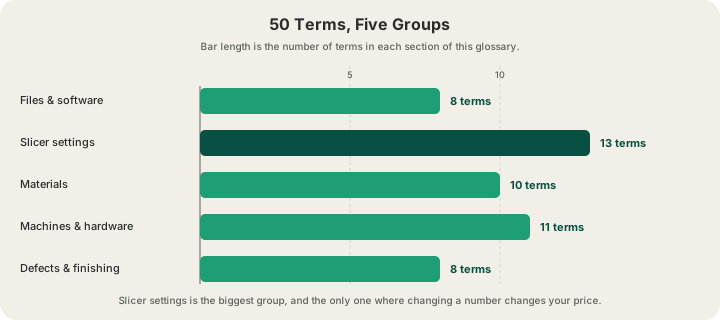
If you want to go deeper on any single group, the two that repay the most attention are slicer settings and tolerances, because they are the only ones where a small change to a number produces a large change to the part. /blog/3d-printing-infill-explained covers density and patterns properly, and /blog/3d-printing-tolerances-guide covers designing gaps that fit on the first try.
Using the Vocabulary in an Order
You do not need any of this to order a print. Upload an STL, GLB, 3MF or G-code file at /print and the quote comes back from a real OrcaSlicer slice of your model, so the grams shown are the grams the machine will actually lay down. PLA is $0.12 per gram all-in with a $1.00 minimum per part, and US shipping is $7 flat. If you have no model yet, /design generates one from a text prompt.
Where the vocabulary earns its keep is in the notes field. Asking for 0.1 mm layers on a display piece, 40% gyroid on a jig, or 0.3 mm clearance on a snap fit gets you a better part than any default we could guess — and now you know exactly what each of those requests means.
FAQ
What is the difference between a mesh and a model?
A CAD model is defined by parametric geometry: a cylinder is a cylinder, described mathematically and resolution-independent. A mesh is that shape approximated with flat triangles, and it is what printers consume. Exporting to STL, 3MF or GLB is the moment the conversion happens, which is why export resolution matters and why you cannot edit dimensions afterwards.
Do I need to understand G-code to get something printed?
No. G-code is generated for you, and it is machine-specific anyway — a file sliced for one printer will not behave on another. We accept .gcode and .gcode.3mf if you have already sliced for a Bambu machine and want exact control, but uploading an STL, GLB or 3MF and letting us slice it is the normal path.
Which terms actually change what a print costs?
Four of them. Infill density and wall count set how many grams end up in the part, layer height sets whether you pay the standard rate or the 1.75× premium 0.1 mm rate, and each AMS colour change adds purge material plus machine time. Everything else on this list changes appearance, strength or print time without changing the bill much.
Why is OBJ on this list if you do not accept it?
Because it is one of the most common export formats in 3D software, so people meet the term constantly and assume it works everywhere. Our uploader accepts STL, GLB, 3MF and G-code. If your tool only exports OBJ, re-export as STL or GLB — every major package can do it, and nothing about your geometry is lost in the switch.
Ready to get started?
Upload a 3D model for instant pricing, or generate one with AI.