From Upload to Doorstep: Life of a Farm Print Job
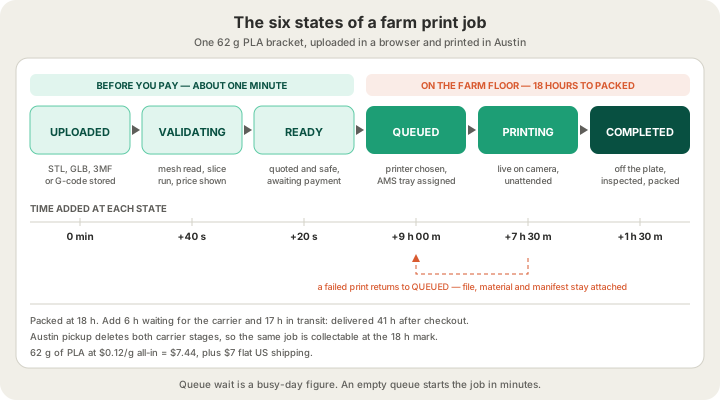
A farm print job is a record long before it is an object. From upload to doorstep it moves through six states — uploaded, validating, ready, queued, printing, completed — and then hands off to a shipment record with five more. The surprise for most people is where the hours go: on a typical order, printing accounts for about seven and a half of the forty-one hours between checkout and delivery. The rest is queue, cooling, packing and a carrier. This is the whole life of one job, tracked hour by hour.
The example throughout is one job rather than a hypothetical: a 62 g PLA monitor-arm bracket, one colour, standard 0.2 mm layers, uploaded as an STL and shipped to a US address. At $0.12 per gram all-in that part is $7.44, plus $7 flat shipping.
A Print Job Is a Record, Not a File
The thing customers picture is a file sitting in a folder waiting for someone to press go. What actually exists is a row in a database with a state, a printer, a filament, a validation score and a manifest of instructions. The file is one field on it. That distinction is the reason a farm can run overnight without an operator: software can read a state and decide what to do next, and it cannot read intent from a folder full of STLs.
| Job state | What it means | What moves it forward |
|---|---|---|
| Uploaded | File stored, nothing read yet | The parser picks it up, in seconds |
| Validating | Mesh or G-code being read and checked | Checks finish and a price appears |
| Ready | Quoted, safe, waiting on a decision | Your payment, or an operator queueing it |
| Queued | Assigned a printer and a filament tray | A plate frees up |
| Printing | On the machine, live on camera | The last layer |
| Completed | Off the plate, inspected, packable | A packer and a shipping label |
Two more states exist that nobody wants to see: failed and cancelled. Failed is not the end of the road — the manifest, the file and the material are all still attached to the record, so a re-queue is one action rather than a fresh order. That is the whole argument for /blog/what-is-a-3d-print-farm as a business model: redundancy is the product.
The First Minute Happens in Your Browser
Upload at /print and the file is parsed rather than merely stored. The mesh is checked for boundary edges and holes, for non-manifold edges where three faces share one edge, for zero-area triangles, and for whether the bounding box fits the 340 x 320 x 340 mm build volume of a Bambu Lab H2S. An oversized part is caught here, not after your card is charged. If a mesh report is unfamiliar territory, /blog/why-print-ready-matters-mesh-validation explains what a failing one looks like.
Then the model is sliced for real. Wherever possible the quote comes from an actual OrcaSlicer slice on a dedicated service, not from mesh volume multiplied by an infill guess, because the expensive parts of a print are decisions the slicer makes: supports, brim, purge, tool changes. The slice returns grams and seconds, and the price is built on those. The bracket comes back at 62 g and 7 h 30 m. Billable weight rounds up to the whole gram, there is a $1.00 minimum per part, and the full rate card sits on /pricing.
Payment Turns a Quote Into Instructions
When the payment clears, an order manifest is written and attached to the job: stored file, material, colour, quality, quantity, scale, infill, and the note you typed into the order box. The note is the field people underestimate. Orientation preferences, a colour to match, a deadline — if you take the trouble to write printing instructions, the person standing at the printer has to be able to see them, so they travel with the record instead of being collected and discarded.
Shipping is settled at the same moment: $7 flat anywhere in the US and free over $50, international $30 and free over $500. Local pickup in Austin is free and removes the carrier entirely, which on our example order deletes 23 of the 41 hours. Bulk discounts apply per unit at 5% for five and 10% for ten, which is roughly where a one-off turns into a production run.
The Job Picks a Filament Before It Picks a Printer
Queueing asks which filament as an explicit, unavoidable step, for every job and not only the multi-colour ones. It reads as fussy and it prevents the single most irritating failure a farm produces: a flawless print in the wrong colour. Each machine carries a four-tray AMS, so a job needing black, white, red and one accent runs without anyone touching a spool. A fifth colour means a physical swap, which becomes a scheduling decision rather than a surprise at 2 a.m.
Printer selection follows. The fleet is Bambu Lab H2S and P2S machines; the H2S sets the published 340 x 320 x 340 mm ceiling and takes the large single-piece work, while smaller jobs spread across whatever is idle. This is the mechanism that makes a farm faster than a fast printer: adding machines does not make any single print quicker, it shortens the wait in front of it, and the wait is where most of the calendar lives. /blog/how-long-does-3d-printing-take breaks that down further.
One Gate Before the Machine
No printer accepts a file until its G-code has been parsed and scored 0 to 100 against a list of commands that have no business in a print file. M112 hard-kills a printer mid-job. M211 S0 disables software endstops and invites the head into the frame. M502 wipes calibration. M301 and M304 rewrite hotend and bed PID values, which is a thermal runaway waiting to happen. Any of those, and the file does not go to a machine that heats to 260 °C unattended. The failure you design for is the one that never reaches a person.
On the Plate, and On Camera
The printing itself is the least eventful stretch of the whole job. Every plate is covered by a live camera stream, which changes what a 3 a.m. spaghetti failure costs: it is visible while it is happening rather than discovered at 8 a.m. with eight hours of filament wasted behind it. Our bracket runs 7 h 30 m, and for most of that the job record simply reports a layer number.
Where the Forty-One Hours Actually Go
| Stage | Duration | Elapsed | Who is working |
|---|---|---|---|
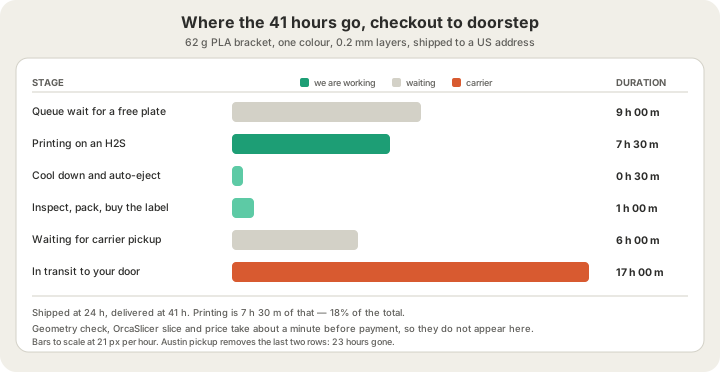
| Queue wait | 9 h 00 m | 9 h | Nobody — waiting for a free plate |
| Printing | 7 h 30 m | 16 h 30 m | An H2S, unattended, on camera |
| Cool and auto-eject | 0 h 30 m | 17 h 00 m | The printer |
| Inspect, pack, label | 1 h 00 m | 18 h 00 m | A human in Austin |
| Waiting for the carrier | 6 h 00 m | 24 h 00 m | Nobody |
| In transit | 17 h 00 m | 41 h 00 m | The carrier |
Read that table as a list of levers. Two of the six stages are pure waiting and account for 15 of the 41 hours. Queue wait is the one a farm attacks by adding machines, which is why fleet size matters more to lead time than print speed does; carrier wait is the one you delete yourself by choosing Austin pickup. Nine hours is a busy-day figure, not a promise.
Off the Plate: Auto-Eject, Inspection, Rework
When the last layer finishes, the plate is scored for automatic ejection. Auto-eject cools the bed and pushes the plate off so the next job can start with nobody in the building, but it is only attempted on parts that will survive being shoved. The bar is deliberately narrow.
- PLA only — other materials need bed heat or peel behaviour that ejection does not handle well
- Under 100 mm tall, so the part cannot topple on its way off
- Between 20 and 150 cm² of footprint — too small to grip, or too large to clear the mechanism
- No taller than three times its own width, the classic tip-over ratio
- Bed at 75 °C or below, so the part has actually released
- A G-code safety score above 70
Our bracket is 38 mm tall on a 71 cm² footprint in PLA, so it ejects and the machine takes the next job immediately. A 240 mm vase fails that test on purpose and waits for a human, because a tipped part is a scrapped part and thirty seconds of automation is not worth eleven hours of print.
Then it is inspected, and this is where a failed job earns its second life. A lifted first layer, a snapped support, a colour that reads wrong against the reference — the part goes back to queued rather than back to you. Because file, material and manifest are all still attached to the record, the reprint costs hours instead of the days a fresh order would take.
Packed, Labelled, Tracked
Packing creates a shipment record, and that record runs its own small state machine alongside the job. It matters because the two are not the same thing: a job can be completed while its shipment is still pending, which is exactly the gap people are looking at when they refresh an order page and see nothing moving.
| Shipment state | What has happened | What you see |
|---|---|---|
| Pending | Boxed, no label bought yet | Order shows packed |
| Label created | Rate chosen, label purchased, tracking exists | Tracking number appears |
| Shipped | Handed to the carrier | Shipped email with tracking |
| In transit | Carrier scans along the route | Live tracking |
| Delivered | Carrier confirmed the drop | Delivered email |
The customer-facing story is deliberately simpler than the internal one: placed, printed, packed, shipped, delivered. Not every stage is worth an email — packed is an internal milestone with nothing you can act on, and a notification you cannot act on is just noise. If you want the same journey told from the software side, /blog/what-happens-after-you-click-print covers the checks and the quoting maths in more depth.
FAQ
How long does a print job take from upload to doorstep?
Budget 24 to 48 hours to shipped and a day or two of transit on top. Our worked example reaches shipped at 24 hours and delivered at 41. The variable is almost never the printing — it is how long the job waits for a free plate, which depends on how busy the farm is the hour you order.
Can I watch my job print?
Every plate on the farm is under a live camera stream, which is how overnight failures get caught in minutes instead of hours. Customer-facing viewing is not a self-serve feature today; if you want eyes on a specific job, ask in the order note and we will send you what the camera saw.
What happens if my print fails halfway through?
The job returns to the queue and reprints on whatever machine frees up first. You are not charged twice and you do not re-upload anything, because the file, material and manifest are still attached to the record. A failure usually costs hours, not a new order.
Can I skip shipping and pick up in Austin?
Yes, and it is free. Pickup removes both carrier stages from the timeline — the six-hour wait for collection and the transit itself — so a job that would deliver at 41 hours is ready for you at 18.
Ready to get started?
Upload a 3D model for instant pricing, or generate one with AI.