Print Farm Etiquette: Collection and Shared Machines
Print farm etiquette comes down to one idea: a shared printer is only available to you because the last person left it available. Collect your parts as soon as they are cool, leave the plate clear, ask for a filament change instead of swapping a spool yourself, and never hit stop on a machine you do not hold. Every other rule in this guide is a consequence of those four, and most of them turn out to be a button in the dashboard rather than a favour you have to ask for.
The Bottleneck Is the Plate, Not the Printer
A printer that has finished a job is not free. It is holding a completed part on a heated bed, and until that part comes off, the machine is a shelf. This is the single fact that explains almost all shared-machine etiquette, and it is easy to miss because nothing about the printer looks busy. The status light is calm, the gantry is parked, and the queue behind it is stopped anyway.
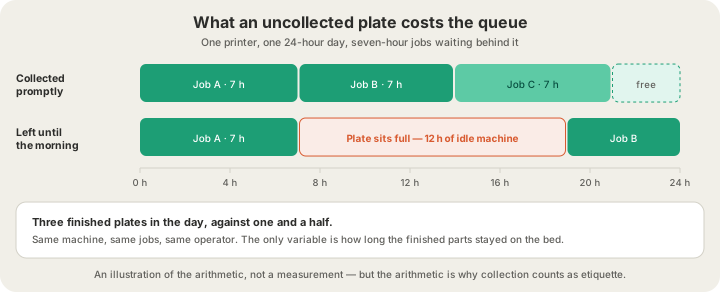
The arithmetic is unforgiving and completely undramatic. A seven-hour job on a machine collected promptly leaves room for two more the same day. The same job left on the bed until morning costs twelve idle hours, which is not a queue delay for you — you already have your part — but for whoever was behind you. On a farm that means somebody's order ships a day later. In a makerspace it means the person who booked the 9 a.m. slot finds a plate they are not allowed to touch.
Collection: Why Some Plates Clear Themselves and Some Wait for You
Automation takes the easy half of this problem off your hands. When a job finishes on our farm, the plate is scored for auto-eject: if it passes, the part is cooled and pushed off so the next job can start with nobody in the room. If it fails the test, it waits — deliberately, because a tipped part is a scrapped part and a scrapped part is somebody's reprint.
| Condition to auto-eject | Why it exists |
|---|---|
| Material is PLA | Warping and adhesion behave predictably enough to push |
| Under 100 mm tall | Tall parts topple rather than slide |
| 20–150 cm² of footprint | Too small skids, too large binds on the plate |
| No taller than 3× its own width | Aspect ratio is what decides tipping, not height alone |
| Bed at 75 °C or less | A hot bed still grips; a warm part still deforms |
| Safety score above 70 | The same G-code scan that let the job run at all |
So the etiquette is narrower than it sounds. You are not responsible for every plate; you are responsible for the ones that could not clear themselves — the tall vase, the wide flat panel, the PETG bracket. Those are exactly the jobs worth checking on, and the live camera on every machine means checking takes ten seconds from anywhere. /blog/how-long-does-3d-printing-take breaks down where the rest of the calendar time in an order actually goes, and collection is a bigger slice of it than most people assume.
Requests Instead of Reaching
Most bad shared-machine behaviour is not selfishness. It is somebody being helpful with hardware they do not have context on: clearing a plate that was mid-cooldown, swapping a spool that another job was mapped to, pressing stop on a print that looked wrong and was not. The fix is that every one of those intentions has a request that does the same thing safely, and the request is faster than the fix it replaces.
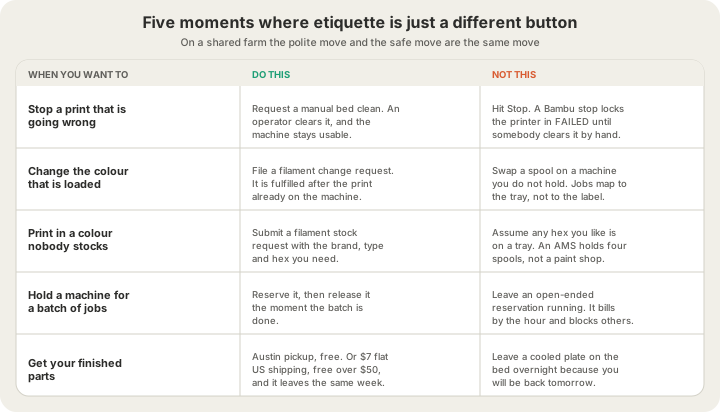
| What you need | The request | What it does |
|---|---|---|
| A plate cleared | Manual bed clean | An operator clears it and nudges the printer back to idle |
| A different colour loaded | Filament change | Queued now, fulfilled after the current print finishes |
| A colour nobody stocks | Filament stock | Brand, type, colour and hex go into the catalogue if approved |
| Someone to look at a job | Bed clean, with a note | The note travels with the request to the person at the machine |
There is one detail in that filament change row worth knowing, because it prevents the most common shared-machine disaster. While a change request is pending on a printer, that printer will not start a new job. It sounds fussy. It means nobody's print begins in the colour that is about to be pulled out of the tray, which is the difference between a scheduling annoyance and eight hours of perfectly executed grey.
Why You Cannot Just Hit Stop
This is the rule that surprises people, and it is not about ownership or politeness. On a Bambu machine, a stop is not a pause with a tidy exit. The printer drops into a failed state and stays there until somebody is physically present to clear it. Stopping a print you are worried about therefore converts a possibly-fine job into a definitely-locked printer, which is a strictly worse outcome for everyone including you.
The same logic covers the reflex to open a door, lift a corner to peek underneath, or pull a spool to check what colour it really is. All three are reasonable instincts on a machine you own. On a shared one they are irreversible edits to somebody else's job, made without the context that would tell you whether the thing you are worried about is a problem at all. Watch it on the camera and file a request. That is the entire skill.
Filament Etiquette on a Four-Tray AMS
An AMS holds four spools. That is the whole budget, and it is shared. Jobs are mapped to trays, not to colour names, so pulling a spool and putting a different one in the same slot does not change what the next job asks for — it changes what the next job gets. This is the most expensive well-intentioned action available on a farm floor.
Four trays also explains why a fifth colour is a scheduling decision rather than a preference. Somebody has to be at the machine, the change has to land between jobs rather than during one, and the print that follows pays for it: every filament change flushes the nozzle, which on Bambu's own H2S profile is 84 mm³ of purge per change plus the machine time to do it. Requesting a colour swap you do not really need is not free to anyone. /blog/multi-color-printing-waste-purge-towers covers how to design that cost down instead of paying it.
The practical version: pick from the colours already loaded when you can, batch your colour-critical jobs so one change serves several, and file a stock request well before the week you need it rather than the morning of.
If You Reserve a Machine, Release It
Reserving a printer at /farm makes it yours: your queue, your filament pack across the four trays, your live camera. It also removes it from the general fleet, which is the point and also the obligation. A reservation is metered from the moment you take it to the moment you release it and settled against the card on file, so an open-ended reservation you forgot about is billing you and blocking somebody else at the same time. The full rate card is on /pricing.
Release it when the batch is done, not when you next remember. If you are between iterations and genuinely want to hold the machine, that is a legitimate use of open-ended — the etiquette failure is the reservation nobody is using, not the one somebody is. /blog/what-is-remote-3d-printing explains how the reservation model differs from ordering a one-off part, and which of the two you actually want.
Makerspace, Library, Office, Farm
The rules rhyme across every kind of shared printer, but who absorbs the mistake changes, and that is what should change your behaviour.
| Makerspace or library | Office printer | Print farm | |
|---|---|---|---|
| Who clears a plate | You, before your slot ends | Whoever notices | An operator, or auto-eject |
| Who pays for a failure | You, in filament and slot | The team budget | The farm — you are quoted per part |
| Cost of a stop | Your booking, and the next one | An afternoon | The machine is locked until cleared |
| How you ask for a change | A person, in the room | A message nobody reads | A tracked request with a status |
| Cost of not collecting | A queue of annoyed members | A pile on a desk | Idle machine hours for everyone |
The column that matters is the last row. On a farm, not collecting is invisible to you and expensive to strangers, which is precisely the shape of problem that etiquette exists to solve. Nobody will ever tell you off for it. The queue just gets slower for everybody, including you, next week.
The Short Version
- Collect promptly, or choose shipping and let the plate clear tonight rather than Thursday.
- Never stop a print on a machine you do not hold — request a manual bed clean.
- Never swap a spool on a machine you do not hold — file a filament change request.
- Check the camera before you touch anything. Most of what looks wrong is not.
- Release a reservation the moment the batch is finished.
- Put your order note in the order, not in a message. The note travels with the job to the person at the printer.
None of this is unique to us. It is what makes any shared machine work, from a library MakerBot to a hundred-printer floor, and /blog/what-happens-after-you-click-print shows where each of these touchpoints sits in the pipeline behind a single order.
FAQ
How long should you leave a finished print on a shared printer?
As close to zero as you can manage. A finished plate is an idle machine, and a seven-hour job left overnight can cost the queue twelve hours it will never get back. On our farm most PLA parts under 100 mm auto-eject and clear themselves; tall, wide or non-PLA parts wait for a person, and those are the ones worth collecting the same day or shipping instead.
Can I stop someone else's print if it looks like it is failing?
No — and this is a mechanical fact rather than a rule about manners. A stop on a Bambu machine leaves the printer in a failed state until somebody physically clears it, so stopping a job that might have been fine reliably makes things worse. Request a manual bed clean and add a note about what you saw. An operator gets to it and the machine stays usable.
Is it rude to change the filament on a shared 3D printer?
It is worse than rude, because jobs are mapped to AMS trays rather than to colour names. Putting a different spool in the same slot does not stop the next job — it prints it in your colour. File a filament change request instead: it is queued immediately, fulfilled after the current print, and it blocks new jobs from starting on that machine until the change lands.
What if I can't collect my parts in person?
Choose shipping and stop thinking about it. US shipping is $7 flat and free over $50, and pickup in Austin is free if you are local and actually coming. The considerate choice is whichever one gets the plate cleared tonight, not whichever one you feel you ought to do.
Ready to get started?
Upload a 3D model for instant pricing, or generate one with AI.