How a Print Farm Detects Failures Before You Do
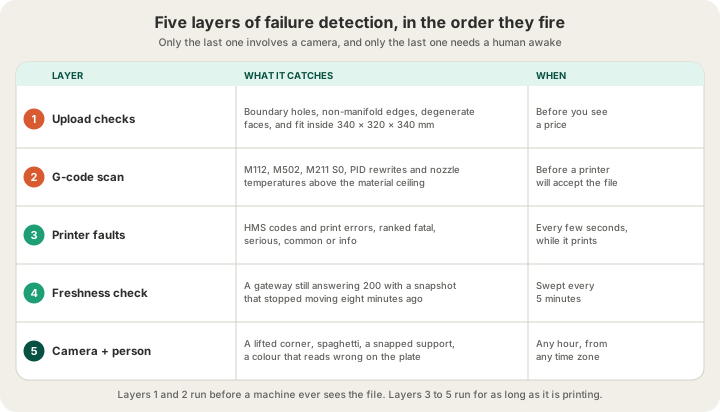
A print farm detects failures in layers, and most of those layers fire before a nozzle ever moves. Your file is checked for holes and for fit at upload, the sliced G-code is read for commands that could damage a machine, the printer streams its own fault codes while it runs, a server-side sweep watches for telemetry that has quietly stopped moving, and a live camera covers every plate. By the time you would notice anything was wrong — an order that has not shipped, a tracking number that never arrived — five separate systems have already had their chance to catch it.
Failure Detection Is a Stack, Not a Camera
Ask most people how a print farm spots a failed print and they describe a camera watching for spaghetti. That is real, and we have it on every machine, but it is the last line rather than the first. A camera can only see a failure that has already happened, on plastic you have already paid for, on a machine that has already spent hours making it. Everything upstream of the camera exists to make sure the camera has less to find.
The stack has a shape: the cheapest checks run earliest, and each later layer costs more to reach. A malformed mesh caught at upload costs nothing. The same mesh caught by a camera at hour six costs six printer-hours, a plate of filament and a slot somebody else could have used.
Layer 1: The Print That Never Starts
The upload at /print is not a file drop with a spinner on it. Before you are shown a price, the mesh is parsed and analysed: how many boundary edges it has, how many separate holes those edges form and how wide the widest one is in millimetres, whether any edge is shared by three or more faces, whether there are zero-area triangles or normals pointing the wrong way, and whether the bounding box fits inside the 340 by 320 by 340 mm build volume of an H2S.
Those are not aesthetic complaints. A 12 mm gap in a wall does not slice into a wall; it slices into two disconnected shells that the printer will happily draw in mid-air. Winding errors turn a solid into confetti. An oversized part fails at the moment the plate runs out, not at the moment you upload it, which is the worst possible time to find out. /blog/why-print-ready-matters-mesh-validation walks through what each of these looks like on a real model and how to repair one.
One flag matters more than it sounds: whether the file declared its units. STL and 3MF are millimetres by convention and GLB is metres, so a GLB authored at the wrong scale is out by a factor of a thousand. The check says it is assuming rather than printing a confident number nobody measured.
Layer 2: G-code Is a Program, So We Read It
This is the layer most people have never thought about. A sliced file is not a shape — it is a list of instructions for a machine that heats metal to 260 degrees and moves a gantry at speed. Running an unvetted program on that hardware is a farm waiting for an incident. So every sliced file is parsed and scored from 0 to 100 against a list of commands that have no business being in a print file, and the catastrophic ones are treated differently from the merely suspicious.
| Command | What it would do | Result |
|---|---|---|
| M112 | Emergency stop — hard-kills the printer mid-job | Rejected |
| M211 S0 | Disables software endstops — head into the frame | Rejected |
| M502 | Factory reset — wipes the machine's calibration | Rejected |
| M301 / M304 | Rewrites hotend or bed PID values | Rejected — thermal runaway risk |
| M851 / G28.1 | Moves the Z-probe offset or the home position | Rejected — nozzle crash risk |
| M500 / M999 | Writes settings, or restarts the board | Flagged for a human to read |
Alongside the command scan, nozzle and bed temperatures are checked against per-material ceilings — PLA is capped at a 260 degree nozzle and a 75 degree bed — and the file's declared printer model and plate footprint are compared against the machine it is headed for. A file sliced for a 256 mm bed does not silently go to a larger one. None of this says your model is wrong; it says a file is a program, and a program deserves a read before it runs.
Layer 3: The Printer Reports Its Own Faults
Once a job is running, the richest source of failure information is the machine itself. Bambu printers publish a Health Management System array — HMS for short — alongside their live state. Healthy printers publish an empty one. Everything else arrives as a code with a severity baked into it, plus a single print error field for a fault that stopped the running job.
| Severity | What it means | What the farm does |
|---|---|---|
| Fatal | The machine cannot continue | Job marked failed, printer pulled from the pool |
| Serious | Print is compromised or halted | Alert raised, operator request opened |
| Common | Recoverable, usually filament or AMS | Alert raised, cleared automatically when it stops |
| Info | Status, not a problem | Recorded, no request opened |
The interesting engineering problem here is not reading the codes. It is deciding which ones deserve a human. A printer will tell you that the chamber is cooling more slowly than it would like, or that it reloaded a G-code file and resumed printing on its own. Those are worded like faults and are not faults: nothing is stuck, no fix unblocks anything, and paging an operator for them trains everyone to ignore alerts. So advisory messages are separated out by their wording rather than by code, because gateways substitute their own text and a code list would miss the ones they reword.
We also do not ship a guessed lookup table of code meanings. A code mapped to the wrong sentence is worse than an honest one, because it sends an operator to fix the wrong thing on the wrong machine. Codes without a verified name are shown as-is and logged so they can be named properly later. If the fault is on the AMS side, /blog/ams-errors-decoded reads the symptom on the plate and names the cause.
Layer 4: Watching the Watcher
Here is the failure mode nobody expects, and it is the one that taught us the most. Each printer talks to the farm through a small gateway box. When that gateway's connection to the printer dies, its API does not start returning errors. It keeps answering, cheerfully, with the last snapshot it received. The state reads RUNNING. The temperatures are plausible. The percentage is plausible. A finished print showed as RUNNING, layer 8 of 33, 33 percent, for hours.
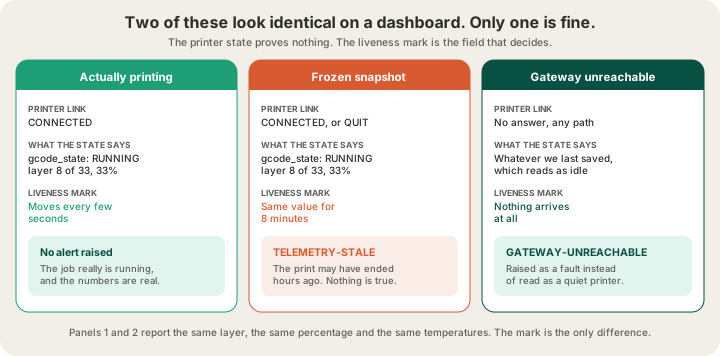
Any check that asks is there printer state? reports a healthy printer in all three cases. The field that actually moves is a liveness mark stamped when a message genuinely arrives. Frozen link, frozen mark. So the mark is stored along with when we first saw it, staleness is measured in real time rather than in memory, and a mark that has not changed in eight minutes raises a fault of its own. Eight is deliberate: a sweep runs every five minutes, so the threshold has to clear one interval or a single quiet gap between observations would read as an outage.
| Symptom | What it looks like | What actually catches it |
|---|---|---|
| Printing normally | RUNNING, layer 8/33, 33% | Nothing — the mark is moving |
| Gateway link died | RUNNING, layer 8/33, 33% | Mark unchanged for 8 minutes |
| Gateway unreachable | The last state we saved, so: idle | Nothing answered on any path |
| Job finished, nobody noticed | Still RUNNING, forever | The same sweep, closing it out |
That sweep does something else worth mentioning: it clears alerts as well as raising them. Detection used to live inside the dashboard's own live stream, which meant an alert could only be cleared by the same page that raised it. Close the tab and whatever was on screen froze there — including faults the printer had already stopped reporting. A fault that cannot clear itself is a fault nobody trusts. Now a cron re-evaluates every machine from the server, real faults keep their timestamps fresh, and anything the printer no longer reports clears on its own.
Layer 5: The Camera and the Person
Everything above is telemetry, and telemetry has a blind spot: a print can fail perfectly. The machine believes it is doing exactly what it was told, and it is. None of the following raises a single fault code:
- A first layer that lifted at one corner three hours ago and has been extruding into air ever since
- A support that snapped at hour two, under an overhang the slicer was confident about
- A colour that is genuinely the filament in the tray and still reads wrong against the customer's reference
- Warping on a wide flat base, which arrives as a part that will not sit level
So every plate is covered by a live camera stream: a spaghetti failure at 3 a.m. is visible at 3 a.m. rather than discovered at 8. And a person still looks at the finished part before it is packed, because the last check in the stack is the only one that can compare an object against what somebody expected.
What Happens Once a Failure Is Confirmed
The part goes back in the queue. That sentence is short because the interesting work already happened: the file, the material, the colour, the quantity and the note you typed at checkout are all still sitting there in the order manifest, so a reprint is a scheduling decision rather than a conversation. It lands on whichever machine is free, which usually costs hours rather than days. /blog/what-happens-after-you-click-print covers where that manifest comes from and what else it carries.
This is the actual product of a print farm, and it is worth being blunt about it. Redundancy is what you are buying. One printer in a garage has the same failure rate as one printer in a farm; what it does not have is a fleet around it, a queue that can absorb a reprint, and somebody in the room. /blog/what-is-a-3d-print-farm makes the same argument from the business side, and you can see the current fleet on /farm.
The economics explain the order of the stack. At $0.12 per gram all-in for PLA, a failed 40 gram part is under five dollars of plastic, and that is not the expensive part. The printer-hours, the plate, the queue position and the day it adds to somebody's order are. Which is why the cheap checks run first and the camera runs last.
FAQ
How do print farms detect failed 3D prints?
In layers. Geometry is checked at upload, sliced G-code is scanned for unsafe commands before any printer accepts it, the printer's own HMS fault codes and print errors are read while it runs, a server sweep every five minutes catches telemetry that has stopped moving, and a live camera plus a human covers what none of those can see — a lifted corner, a snapped support, a colour that reads wrong.
Can a print farm tell if a print failed overnight?
Yes, and the harder case is a printer that stops reporting rather than one that reports a fault. A gateway with a dead link keeps serving its last snapshot, so a finished or failed job can read as RUNNING indefinitely. That is caught by watching a liveness mark instead of the state: unchanged for eight minutes, and a stale-telemetry fault is raised whether or not anyone has the dashboard open.
What happens to my order if the print fails?
It is requeued and reprinted. The file, material, colour, quantity and your order note are stored with the order, so nothing needs to be re-uploaded or re-agreed. It usually costs hours rather than days, because the reprint goes to whichever machine is free rather than waiting for the one that failed.
Does a failed print cost me anything?
No. You are quoted from a real slice of your model and pay for the part, not for our attempts at it — $0.12 per gram all-in for PLA, with a $1.00 minimum per part and billable weight rounded up to the whole gram. Wasted filament and printer time on a failure are the farm's problem, which is the correct incentive for building five layers of detection.
Ready to get started?
Upload a 3D model for instant pricing, or generate one with AI.