Can You 3D Print From a Phone?
Yes. You can go from an idea to a printed part entirely on a phone, and none of it requires installing an app. In a mobile browser you can generate a 3D model from a typed prompt or a photo, upload an STL somebody sent you, see a real sliced price before you commit, pay, and track the job through our Austin farm. What a phone genuinely cannot do is the fiddly middle work: repairing a broken mesh, precision CAD, or running a slicer yourself.
That split is the whole story, and it is a better split than it sounds. The parts a phone is bad at are exactly the parts a print farm already does for you. Here is what each route looks like, what it costs, and where the phone runs out of road.
The Three Ways to 3D Print From a Phone
Everything people mean by "printing from a phone" collapses into three routes. The first two end with a part in the post; the third is about supervising machines you are not standing next to.
| Route | What you need on the phone | Time to a real price | Best when |
|---|---|---|---|
| Generate a model | A sentence, or one photo from the camera roll | About 60 seconds | You have an idea, not a file |
| Upload a file | An STL, GLB, 3MF or G-code saved in Files or Drive | Seconds after the upload finishes | Someone sent you a model, or you downloaded one |
| Supervise a printer | A browser and an account | Quoted per job before it queues | You have a run of parts and want to watch it happen |
Route 1: Make the Model on the Phone
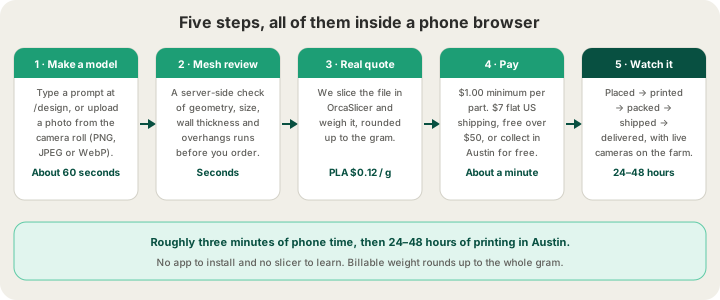
The AI generator at /design runs in a mobile browser, and typing a prompt is arguably easier on a phone than on a laptop. Describe the object in a sentence, wait about 60 seconds, and you get a mesh you can spin with a finger. The generated model then goes through a server-side printability review before you are allowed to order, which checks geometry, overall dimensions, estimated wall thickness and overhangs. That review is the reason a phone workflow is viable at all: you are not being asked to judge a mesh on a six-inch screen, because something else already did.
Photos work too, and this is where a phone actually beats a desktop, because the camera is already in your hand. Upload a PNG, JPEG or WebP straight from the camera roll and the generator infers the geometry the lens never saw. One object, plain background, even lighting, shot straight on. We went through what succeeds and what fails in /blog/image-to-3d-model-photo-to-print, and the short version is that photo quality maps almost one-to-one onto model quality. Prompts have their own craft: name the object, then its style, then its use, and leave the material out of it.
Route 2: Upload a File You Already Have
If a model already exists, the print page takes it directly from the phone. On iOS the file picker reaches iCloud Drive, Google Drive, Dropbox and anything saved into Files from an email attachment or a chat; Android's picker behaves the same. Accepted formats are STL, GLB, 3MF and sliced G-code as .gcode or .gcode.3mf. Mesh files are capped at 100 MB and sliced files at 40 MB. OBJ is not accepted, which trips up more people than any other rule, and we unpacked the whole format question in /blog/what-file-do-i-need-to-3d-print.
Once the file lands, the quote comes from a real OrcaSlicer slice of your geometry rather than a bounding-box estimate, so the number you see on the phone is the number you pay. You pick material and colour on the same screen. The only phone-specific caution is bandwidth: a 60 MB sculpt over one bar of signal is a long upload that a lock screen can interrupt. Do the big ones on Wi-Fi, or reduce the triangle count before you leave the house.
Route 3: Supervise a Printer From the Phone
The third route is not about making a file at all. Our farm dashboard is browser-based, so a phone can see live camera streams of the plates, the queue state, and each job moving through placed, printed, packed, shipped and delivered. Uploaded G-code passes automated safety validation before it reaches a machine, which is what makes remote job submission safe to allow in the first place. If the idea of driving a machine you are not standing next to is new, /blog/what-is-remote-3d-printing lays out the models, and the fleet behind it is Bambu Lab H2S and P2S machines with 4-tray AMS units, all of it in Austin.
What a Phone Order Costs
Exactly what a desktop order costs. Pricing is per gram and all-in, meaning filament and normal machine time in one number, with no separate setup fee: PLA is $0.12 per gram, billable weight rounds up to the whole gram, and every part has a $1.00 minimum. Here is what that looks like for objects people actually order from a phone.
| Part | Printed weight | PLA at $0.12/g |
|---|---|---|
| Keychain tag | 8 g | $1.00 (the per-part minimum) |
| Cable clips, set of four | 24 g | $2.88 |
| Phone stand | 42 g | $5.04 |
| Controller wall mount | 76 g | $9.12 |
| Desk planter | 180 g | $21.60 |
Where the Phone Runs Out of Road
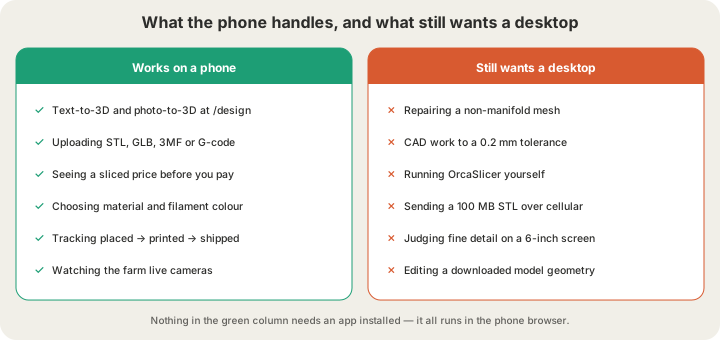
The honest limits are all about editing rather than ordering. Mobile CAD exists, and it is fine for a bracket with three dimensions on it, but nobody is holding a 0.2 mm press fit on a touchscreen. If you are designing parts that have to mate with something, do that work on a computer where you can dimension it properly. Mesh repair is the same story: fixing a non-manifold model needs real tooling, which is why our upload review tells you a model has a problem instead of expecting you to spot it.
- Mesh repair. Holes, flipped normals and self-intersections need a desktop tool. Our review flags them; it does not ask you to fix them on a phone.
- Tight tolerances. Designing a snap fit or a threaded insert by thumb is not realistic.
- Large files. 100 MB is the mesh cap, but cellular is the practical one. Wi-Fi for anything over about 20 MB.
- Judging surface detail. A model that looks clean at phone scale can hide detail too fine for a 0.4 mm nozzle to reproduce.
- Slicing your own G-code. OrcaSlicer and Bambu Studio are desktop software. If you want that control, slice on a computer and upload the result later from anywhere.
A Phone-Only Order, Step by Step
- Open x3dstudios.com in Safari or Chrome. Nothing to install.
- Go to /design and either type a prompt or upload a photo from the camera roll. Wait about a minute.
- Read the printability review. If it flags thin walls, regenerate with a simpler shape rather than arguing with it.
- Send the model to /print, pick a material and a colour, and confirm the bounding box in millimetres looks like the size you meant.
- Check the quote, which is a real slice of your geometry, then pay. $1.00 minimum per part, $7 flat US shipping, free over $50.
- Track the job from placed to delivered. Most orders print in 24 to 48 hours in Austin.
FAQ
Can you 3D print from an iPhone?
Yes, and everything described here works in Safari on iOS with nothing installed. Photos upload from the camera roll as PNG, JPEG or WebP; models saved in the Files app upload as STL, GLB, 3MF or G-code. Android with Chrome behaves identically, including the file picker reaching Drive and Dropbox.
Is there an app I have to download?
No. Generating, quoting, paying and tracking all happen on the website in a mobile browser. The only reason to reach for a desktop is if you want to edit or repair a model yourself, or slice your own G-code, and neither is required to get a part made.
Can I send a file from my phone straight to my own printer?
That depends on your printer, not on us. Bambu Lab machines have their own phone app for sending an already-sliced file and watching progress, but the slicing itself still happens on a computer in almost every workflow. If you do not own a printer, uploading to a farm is the shorter path, and /blog/how-to-3d-print-without-owning-a-printer compares the options side by side.
How big a file can I upload over cellular?
The limits are the same as on a desktop: 100 MB for STL, GLB and 3MF, and 40 MB for sliced G-code. The real limit is your connection. A 60 MB sculpt over a weak signal is a long upload that a backgrounded browser can cancel, so do those on Wi-Fi or decimate the mesh first. Most everyday models are well under 20 MB and upload in seconds.
Ready to get started?
Upload a 3D model for instant pricing, or generate one with AI.