Gradient and Silk Filaments: One Spool, Many Colors
Gradient and silk filaments are single spools that produce more than one look in the finished part. Gradient filament (also sold as color-change or rainbow) shifts hue continuously along its length, so the print changes color as it grows. Silk filament carries additives that give plain PLA a high, almost metallic sheen. Both feed from one AMS tray, and that is the entire commercial point: the printer never stops to swap filament, so there is no purge waste and no tool-change time. A 40 g part comes off the plate multi-colored and still costs 40 × $0.12 = $4.80 at our all-in PLA rate.
Gradient, Silk, and the AMS Are Three Different Tricks
It is worth separating what these materials do before comparing them to multi-material printing, because they solve different problems. Gradient controls which color appears at a given height. Silk controls how light bounces off the surface. An AMS controls where color lands on the model. Only the third one costs real money, and it costs a lot of it.
| Approach | Trays | Filament changes | What you get | Print price, 40 g part |
|---|---|---|---|---|
| Gradient spool | 1 | 0 | Color shifts as the part gets taller | $4.80 |
| Silk PLA | 1 | 0 | One color, glossy specular sheen | $4.80 |
| Silk gradient | 1 | 0 | Both effects on one spool | $4.80 |
| 4 colors, banded by height | 4 | 3 | Hard color lines where you set them | From your own sliced file |
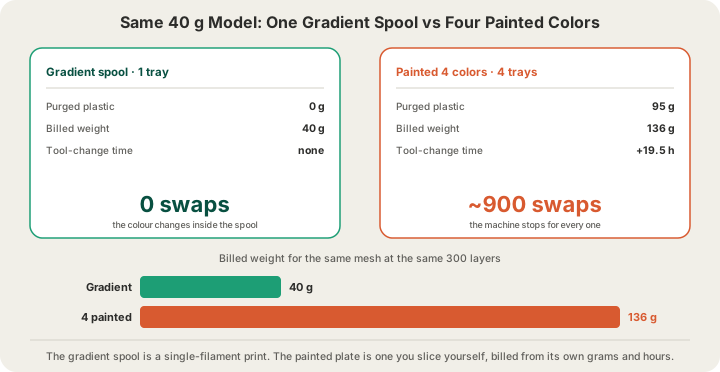
| 4 colors, painted on the mesh | 4 | ~900 | Color exactly where you drew it | From your own sliced file |
Those last two rows are the same mesh, the same four spools and the same 300 layers, and they are the reason this article exists. Every filament change purges 84 mm³ of plastic out of the nozzle and burns about 1.3 minutes of machine time, so a painted model that swaps colors on nearly every layer turns 40 g of part into 136 g of plastic and adds 19.5 hours of swapping. A plate like that is one you paint and slice yourself and upload as a sliced file, and it is priced from the grams and hours the slicer measured, which already contain every purge and every change. We walk through that arithmetic in detail in /blog/multi-color-printing-waste-purge-towers. A gradient spool does zero of it. The color changes because the filament itself changed, not because the machine stopped.
How a Gradient Spool Actually Changes Color
A gradient spool is manufactured with the pigment blend shifting gradually as the filament is extruded, so a length of it laid out on a table would run through the palette from one end to the other. The transition happens over meters, not centimeters. That means the color you get in a given part is not a property of the model at all. It is a function of how much filament that part consumes, and in what order.
The conversion you need is simple. Standard 1.75 mm filament has a cross-section of about 2.4 mm², so one meter is roughly 2.4 cm³, and at PLA's 1.26 g/cm³ density that is almost exactly 3 g per meter. Everything about gradient prints follows from that number.
| Filament consumed | Length of 1.75 mm PLA | What it looks like |
|---|---|---|
| 3 g | 1 m | Barely a shift on most spools |
| 15 g | 5 m | A typical single color band |
| 45 g | 15 m | Three visible bands |
| 1,000 g | 330 m | A full spool, start to finish |
So a 40 g keychain printed on its own will come out in roughly two and a half of those bands, whatever they happen to be at that point in the spool. Print the same keychain when the spool is half used and it is a different pair of colors. This is not a defect: it is what people buy gradient filament for. It does mean a gradient part is not a repeatable product, which matters if you are printing a run of them.
The Part Decides Where the Colors Land
Because the gradient advances with grams consumed and the printer builds bottom to top, the shape of your model sets the height of every color band. Three things move that number more than anything else.
- Cross-section. A tall, thin part uses few grams per millimeter of height, so a band stretches over a long stretch of Z. A wide, chunky part burns through the same band in a few layers.
- Copies on the plate. The printer draws every object on a plate layer by layer, so four copies consume four times the filament per millimeter of height. Each copy gets bands a quarter as tall, and all four match each other.
- Hidden consumption. Infill, supports and brims advance the spool exactly like the visible walls do. A solid part chews through the gradient inside itself where nobody will ever see it.
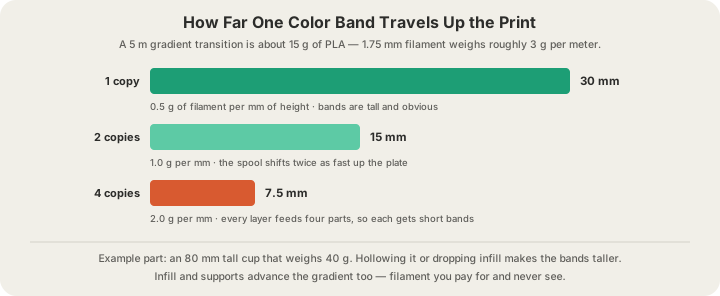
Hollowing is the biggest single lever here, and it works in both directions: it saves material and it stretches the gradient. A vase that weighed 180 g solid and 60 g hollow gets three times the height out of every color band, and costs a third as much at $0.12/g. The mechanics of doing that safely are in /blog/how-to-hollow-a-model.
What Silk Filament Costs You in Surface Quality
Silk PLA looks spectacular in photographs and it is honest about why: the additives that create the sheen make the surface reflect light directionally instead of scattering it. That is also the catch. A matte surface hides small defects by diffusing light across them. A specular surface does the opposite, turning every ridge into a bright line.
- The Z-seam becomes a visible stripe. On matte PLA the seam is a texture you have to hunt for; on silk it catches the light down the whole side of the part. Seam placement stops being cosmetic housekeeping and becomes a design decision, which is what /blog/z-seam-placement-guide is about.
- Stringing and blobs show. Any small ooze that would vanish on a matte part reads as a shiny speck on silk.
- Support scars are obvious. The dull patch left where a support touched the part contrasts hard against the surrounding gloss.
- Layer bonds tend to be weaker than plain PLA. Silk is a display material. For brackets, jigs and anything that carries a load, print in ordinary PLA or PETG.
The upside is that silk rewards good orientation more than any other material. A part rotated so its largest visible face is a clean vertical wall, with the seam tucked into a corner and no supports touching the show surface, comes out looking injection-molded.
What These Spools Cost to Print at X3D
Exactly what any other PLA costs: $0.12 per gram, all in, with filament and normal machine time in the same number. Billable weight rounds up to the whole gram, every part has a $1.00 minimum, and US shipping is $7 flat (free over $50). There is no color surcharge, because there is nothing to surcharge for. The full rate card by material is on /pricing.
One consequence is worth spelling out. On a painted multi-color job, choosing our premium 0.1 mm layers doubles the layer count, which doubles the number of filament changes, which roughly doubles the tool-change hours on top of the 1.75× rate. On a gradient or silk print there are no changes to double, so premium quality costs you the 1.75× rate and nothing else. Fine layers and single-tray color effects are a good pairing; fine layers and painted four-color models are an expensive one.
When You Should Still Use the AMS
Gradient and silk cannot put a specific color in a specific place. If you need a red logo on a white plate, a two-tone sign, or any part where the color carries meaning rather than mood, you need real multi-material printing with four trays, and you should read /blog/multi-color-3d-printing-explained for how our machines handle it. The compromise most people land on is to keep the color placement coarse: bands and per-object assignments cost three or four filament changes, while painting the same four colors across the full height of the model costs nine hundred.
You can also mix the two. A gradient spool in tray one and solid colors in the other three is a perfectly normal setup, and the gradient behaves exactly as described here, advancing during every purge as well as during printing.
How to Order One
Upload your STL, GLB, 3MF or G-code at /print. We accept those four formats; OBJ is not one of them. The color picker on that page lists the solid filaments we stock plus a custom field, so a gradient or silk request goes in the special instructions box at checkout, alongside anything else you need us to know about orientation or finish. Our quote comes from a real OrcaSlicer slice of your model where possible, so the grams you are charged for are the grams the machine will actually push through the nozzle.
From there it is the usual pipeline: the job queues onto a Bambu H2S or P2S, prints under a live camera, and ships from Austin. Most orders print within 24 to 48 hours, and local customers can skip shipping and pick up. Anything up to 340 × 320 × 340 mm fits our plates, which is enough for a vase tall enough to show a gradient properly.
FAQ
Does gradient filament cost more to print than a solid color?
No. It prints from one tray with zero filament changes, so it is billed as a normal single-color job at $0.12 per gram for PLA. A 40 g part is $4.80 whether the spool is grey or runs through six colors. The spool itself usually costs a little more at retail, but that difference is inside our all-in rate, not added to your quote.
How do I control where the colors change on a gradient print?
By controlling how many grams the printer consumes per millimeter of height. Roughly 3 g of filament is one meter of spool, so a part that uses 0.5 g per mm of height gets twice the band height of one that uses 1 g. Hollow the model, lower the infill, and print one copy at a time for long bands. Add copies to the plate for short, tight ones. You cannot pick the actual colors, only their spacing.
Is silk PLA strong enough for functional parts?
Treat it as a display material. The additives that give silk its sheen tend to weaken layer bonding compared with plain PLA, and the glossy surface advertises every flaw. For brackets, mounts, enclosures and anything that takes load, order plain PLA or PETG and save silk for the pieces people look at.
Can I print gradient filament and AMS colors on the same part?
Yes, on a plate you slice yourself. Our AMS units have four trays, and one of them can hold a gradient spool while the others hold solids. Bear in mind that the gradient keeps advancing during every purge, so each of the 84 mm³ flushes moves it along a little, and the bands will be shorter than the same model printed on the gradient alone.
Ready to get started?
Upload a 3D model for instant pricing, or generate one with AI.