How to 3D Print Without Owning a Printer
You do not need to own a 3D printer to hold a 3D printed part. There are four practical routes: upload a file to an online print farm and have the finished part mailed to you, book a machine at a public library or makerspace, hire a local maker, or buy something already printed. For a single part the online farm is almost always the fastest and cheapest: at X3D Studios you upload an STL, GLB, 3MF or G-code file at /print, see a real price before you pay, and the part ships from Austin in 24 to 48 hours at $0.12 per gram all-in for PLA.
The rest of this guide covers what each route is good at, what you need to have ready before you order, what a part actually costs, and what happens between clicking upload and opening a box.
The Four Ways to 3D Print Without a Printer
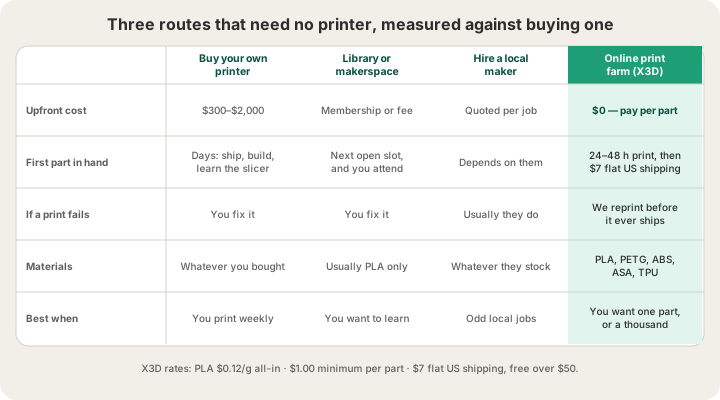
| Route | What you pay | Time to first part | Where it falls down |
|---|---|---|---|
| Online print farm | Per gram of finished part | 24–48 h print, then shipping | You cannot watch it happen in person |
| Library or makerspace | Membership, sometimes per gram | Whenever the next slot opens | You run the machine, and you fix it |
| Local maker | A quoted price, negotiated | Whatever they promise | One machine, one queue, one person |
| Buy it already printed | A finished product price | Normal shipping | You get their design, not yours |
| Buy your own printer | $300–$2,000, plus filament | Days, once you learn to slice | Only pays off if you print often |
1. Upload to an online print farm
This is the closest thing to a vending machine for physical objects. You send a 3D file, a farm slices it, prints it on an idle machine, and ships it. The reason a farm can be cheap for one part is the same reason it is cheap for a thousand: the machines are already bought, already running, and already loaded with filament, so your job is one plate among many rather than a whole afternoon of someone's time. Our fleet is Bambu Lab H2S and P2S printers with 4-tray AMS units, and there is more on how that works day to day in /blog/what-is-a-3d-print-farm.
2. Book a library or makerspace machine
Plenty of public libraries and university makerspaces have printers you can use for the cost of a membership or a small per-gram charge. It is the best route if what you actually want is to learn: you will load filament, level a plate, watch a first layer go down, and understand why the corner lifted. It is the worst route if you just want the object, because you supply the labour, the time slot, and the recovery when a 9-hour print fails at hour 7.
3. Hire a local maker
Someone nearby with a printer will often print your file for a negotiated price. This works well for odd, fiddly jobs where a conversation beats a form, and for anything you want to collect the same day. The tradeoff is capacity: one person with one or two machines has one queue, no redundancy, and no obligation to reprint a bad part. If you like the same-day part of that idea but want a fleet behind it, local pickup in Austin is an option on our orders too.
4. Buy something already printed
If your goal is a lamp, a planter or a desk organizer rather than a specific design, buying a finished printed product skips the file problem entirely. It is only a dead end when the thing you want does not exist yet, which is exactly when the other three routes start to matter.
What You Need Before You Order
One thing: a 3D file. We accept STL, GLB, 3MF, and already-sliced G-code (.gcode or .gcode.3mf). We do not accept OBJ, so if that is what you have, export or convert to STL first. Mesh uploads are capped at 100 MB and sliced files at 40 MB. If you are unsure which format you are holding or which one to export, /blog/stl-vs-obj-vs-3mf-vs-step-export-formats-explained walks through the differences.
There are three normal ways to end up with a file, and none of them require CAD experience:
- Download one. Free model repositories cover most household and hobby objects, and the files are usually STL, which uploads directly.
- Generate one. Describe the object in words at /design and our AI generator builds a printable mesh you can send straight to the farm, no modelling involved.
- Model one. Browser CAD tools are free and good enough for brackets, spacers, plates, and enclosures, which is most of what people need printed.
Two constraints are worth checking before you upload. First, size: our largest plate is 340 × 320 × 340 mm, which fits most helmets, planters and enclosures, and anything larger has to be split into parts. Second, geometry: a mesh with holes or flipped faces can slice into nonsense, so we run a server-side check on every upload before you are allowed to check out.
What It Costs
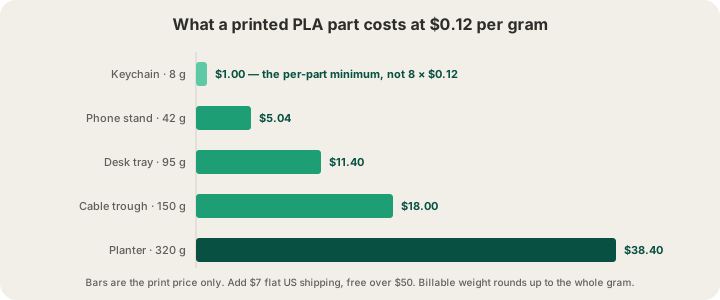
We price by weight, all-in. PLA is $0.12 per gram, and that single number covers both the filament and the normal machine time, so there is no hourly surcharge waiting at checkout. Billable weight rounds up to the whole gram, and the minimum charge is $1.00 per part. Shipping is $7 flat anywhere in the US and free over $50.
| Material | $/g all-in | Typical use |
|---|---|---|
| PLA | $0.12 | Display pieces, prototypes, most household parts |
| PETG | $0.12 | Outdoor and mildly load-bearing parts |
| ABS | $0.12 | Heat resistance, parts you plan to sand or glue |
| TPU | $0.13 | Flexible grips, bumpers, gaskets |
| ASA | $0.14 | Long-term UV exposure, outdoor fixtures |
Two modifiers can move that number. Premium 0.1 mm layers price at 1.75× the base rate, because they halve how much plastic the machine lays down per hour. And bulk goes the other way: 5 or more units take 5% off, 10 or more take 10%. Colour is not one of them: a model we slice for you prints in the single filament you choose, so a two-colour keychain and a one-colour one cost the same, and a genuinely two-colour part is a plate you sliced yourself, billed from the grams and hours it measured. For a full breakdown of where the money in a print actually goes, see /blog/how-much-does-custom-3d-printing-cost.
What Happens After You Upload
The part people find surprising is that the quote is not an estimate. Where we can, we run a real OrcaSlicer slice of your model with the exact profile the printer will use, and the grams and hours that come back are what the machine will actually consume. That is why the number does not move between the quote and the receipt.
- Upload at /print and pick material, colour, layer height, infill and quantity.
- We slice the file and show you the measured weight, print time and price.
- Check out. Sliced G-code uploads get a safety validation pass before anything runs.
- The job is queued to an available H2S or P2S, and prints under a live camera.
- You watch it move through placed, printed, packed, shipped and delivered on the order page.
If you are in Austin you can skip the shipping step and collect the part instead. If you would rather see the ordering flow written out click by click, /blog/how-to-order-3d-prints-online covers it in more detail.
When Buying a Printer Still Wins
Honest answer: iteration. If you are on version nine of a bracket and each version teaches you something in the first ten minutes, owning a machine in the next room beats any service, because shipping time dominates. The same goes for anyone who enjoys the machine itself, which is a completely legitimate reason to buy one.
Everyone else is usually better served by not owning one. A printer you use twice a year is a printer with a clogged nozzle and dried-out filament when you finally need it, and the first print after a long gap is rarely the good one. Services also give you materials and build volumes a single desktop machine cannot: ASA for outdoor parts, TPU for flexible ones, and enough parallel machines that a hundred units and one unit take about the same wall-clock time.
FAQ
Can I 3D print something without buying a printer?
Yes. Upload your file to an online print service and the finished part is mailed to you. At X3D Studios that means STL, GLB, 3MF or G-code at /print, PLA at $0.12 per gram all-in with a $1.00 minimum per part, and $7 flat US shipping. No software, no hardware, no setup.
Where can I get something 3D printed near me?
Public libraries, university and community makerspaces, and independent makers all print locally, and any of them can work for a one-off. The catch is capacity and turnaround: one machine and one queue. An online farm removes both, and if you are in Austin you can order from us and pick the part up in person instead of paying for shipping.
What file do I need to get something 3D printed?
An STL is the safe default and the format almost every model site distributes. We also take GLB, 3MF, and sliced G-code (.gcode or .gcode.3mf). OBJ is not accepted, so convert it to STL first. Meshes can be up to 100 MB and sliced files up to 40 MB.
Is it cheaper to buy a 3D printer or use a service?
It depends entirely on how often you print. A service costs you nothing until you order, so one or two parts a year is never worth a machine. A printer at $300 to $2,000 plus filament, maintenance and your own time starts to pay for itself only if you print regularly and enjoy the process. If you are printing to get an object rather than to have a hobby, a service is almost always cheaper.
Ready to get started?
Upload a 3D model for instant pricing, or generate one with AI.