Multi-Color 3D Printing Explained: How the AMS Works
Multi-color 3D printing on a Bambu AMS works by swapping filaments through a single hotend, not by printing with several nozzles at once. The AMS holds four spools, and every time the print needs a different color it parks the current filament, cuts it, pushes 84 mm³ of plastic out of the nozzle to flush the old color away, and loads the next one. That takes about a minute and a third, and a detailed model can need it 900 times. Understanding that one number is the whole subject: color is cheap, changing color is not.
What the AMS Actually Is
AMS stands for Automatic Material System. It is a box that sits on top of the printer holding four spools, each in its own tray, with a motorized feeder that pushes one filament at a time down a shared tube into the extruder. There is one hotend and one nozzle. The machine is not printing four colors simultaneously; it is printing one color, stopping, and becoming a different single-color printer several hundred times over the course of a job.
That architecture is why an AMS is affordable and why multi-color prints behave the way they do. Nothing about the toolhead changes when you add colors. What changes is how often the printer has to interrupt itself. Our farm runs Bambu Lab H2S and P2S machines with a four-tray AMS on each, which is the same hardware most people have at home, so the numbers below apply to your own printer just as much as to ours.
| 4-tray AMS (one hotend) | Two independent hotends | Pause and swap by hand | |
|---|---|---|---|
| Colors on one plate | Up to 4 per unit | 2 | Any number, one at a time |
| Changes mid-layer | Automatic | Automatic | Not possible |
| Filament purged per change | 84 mm³ | None, each nozzle keeps its own | None |
| Main cost driver | Tool-change time | Calibration and collisions | Your attention |
| On our farm | Yes, H2S and P2S | No | No |
What Happens During One Filament Change
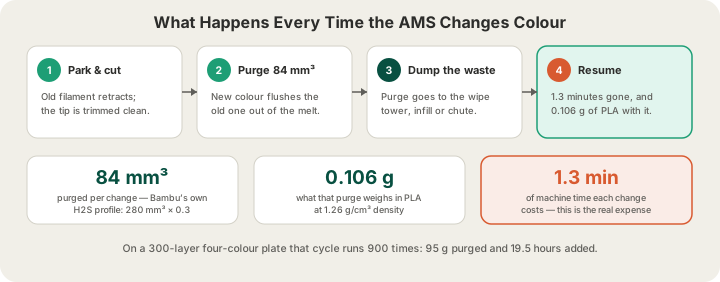
The purge is the part people underestimate. A hotend holds a small reservoir of molten plastic, and you cannot print clean yellow while red is still sitting in the melt zone. The only way to clear it is to push the old color out with the new one until what comes out is the right color. Bambu's own H2S profile in OrcaSlicer specifies this exactly: the flush volume matrix is 280 mm³ for any color-to-color pair, multiplied by a flush multiplier of 0.3, which is 84 mm³ of filament extruded and discarded every single change.
- 84 mm³ of filament, which at PLA's 1.26 g/cm³ density is 0.106 g thrown away per change.
- About 1.3 minutes of machine time to park, cut, load, purge, prime, and wipe.
- Zero change to the part itself. None of that plastic or time ends up in your object.
Modern slicers soften the material cost by flushing part of the purge somewhere useful, into the model's own infill or into support structures, so the waste tracks the size of the print rather than being a flat penalty per change. Nothing softens the time cost. The printer is not extruding your part while it does this, and on a plate with a lot of changes that is where the hours go.
Why Time, Not Plastic, Makes Multi-Color Expensive
Take a real example: a 60 mm tall model that weighs 40 g in a single color. At 0.2 mm layers that is 300 layers. If the colors are spread through the model, the sort of thing you get from a painted or textured design, the printer changes filament on essentially every layer, once per extra color. Two colors means 300 changes. Four colors means 900.
| Colors | Filament changes | PLA purged | Added machine time |
|---|---|---|---|
| 1 | 0 | 0 g | None |
| 2 | 300 | 32 g | 6.5 hours |
| 3 | 600 | 64 g | 13.0 hours |
| 4 | 900 | 95 g | 19.5 hours |
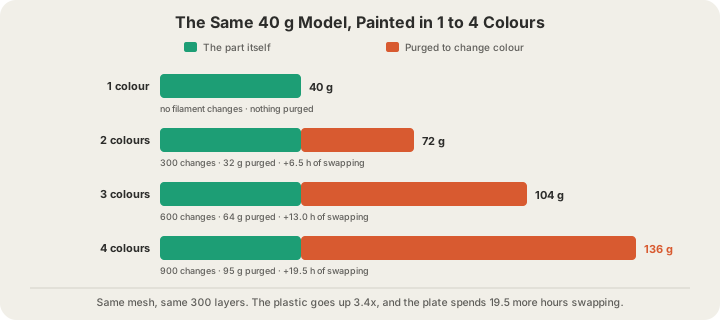
Read the four-color row carefully. The part is 40 g. The purge is 95 g. More plastic ends up in the bin than in the product, and those 900 changes add 19.5 hours to a print that would otherwise take about two. That is the shape of a multi-color job on any AMS machine: the plastic roughly triples and the hours go up by an order of magnitude, and neither of those is a markup anyone chose.
The Design Decision That Sets the Price
Change count is a function of geometry, not of color count. A model with four colors arranged as horizontal bands, a layered nameplate, a striped vase, a two-tone enclosure, changes filament only when the print crosses a band boundary. That is three changes for the whole job, not 900. The same four colors sprayed across the surface of a figurine changes on every layer. Same palette, same mesh volume, two completely different manufacturing jobs.
| Color layout on a 300-layer part | Changes | Purged PLA | Added time |
|---|---|---|---|
| Four bands by height | 3 | 0.3 g | 4 minutes |
| Detail confined to the top 60 layers | 180 | 19 g | 3.9 hours |
| Color spread through all 300 layers | 900 | 95 g | 19.5 hours |
The other lever is splitting the object. Four separately printed single-color pieces that snap together cost zero changes and zero purge, and they let you use colors an AMS could never reach in one job, like a soft TPU grip against a rigid PLA body. Designers who print a lot of multi-color parts reach for this more often than for the paint tool, and it has the side benefit of letting every piece be oriented for its own loads.
How Multi-Color Works at X3D Studios
Every quote starts from a real OrcaSlicer slice of your model where we can run one, not a volume guess. That slice puts the whole plate on one filament, the color you pick at upload, whatever colors the mesh or its texture carries: nothing in our pipeline assigns one region of a model to one tray and another region to a different tray. So a model we slice for you comes out in a single color, and it is priced as the single-color part it is. There is no per-color option and no multi-color surcharge.
A multi-color plate has to arrive already sliced. Paint or band it in Bambu Studio or OrcaSlicer, export the finished .gcode.3mf, and upload that: the tool changes are written into the file, the operator loads the filaments it names into the AMS trays, and we bill the weight and hours your slicer measured, purge and tool changes included. Preparing the file is walked through step by step in /blog/prepare-multi-color-print-bambu-studio. If you have never exported one, /blog/how-to-export-sliced-file-bambu-studio covers the export dialog itself.
Models generated on our AI design page carry their own palette on screen, and the design page says so plainly: multi-color prints are not available there yet, the farm prints the model in the filament you choose, and you are charged the single-color price. Every uploaded file passes G-code safety validation, and jobs run under live camera streams in Austin, Texas, so a 20-hour plate is being watched rather than hoped over.
Everything else about a multi-color order is ordinary: $1.00 minimum per part, billable weight rounded up to the whole gram, $7 flat US shipping and free over $50, and a 340 x 320 x 340 mm build volume on the H2S. Full rates for every material are on /pricing, and the same layer-height and infill choices apply, which /blog/layer-height-explained and /blog/3d-printing-infill-explained cover in detail.
FAQ
How many colors can a Bambu AMS print at once?
Four, one per tray, on a single AMS unit. The printer still has one nozzle, so those four colors are printed one at a time with a filament change between them. More than four in a single job needs either a second AMS or a human standing there to swap spools, and our farm caps custom orders at four for that reason.
Why does multi-color 3D printing waste so much filament?
Because the hotend has to be flushed clean between colors. Bambu's H2S profile purges 84 mm³ per change, about 0.106 g of PLA. That sounds trivial until you count the changes: a 300-layer four-color print does roughly 900 of them and purges about 95 g, which on a 40 g part is more waste than product. Slicers reduce the sting by flushing some of it into infill and supports.
Does multi-color printing cost more per gram?
No. PLA is $0.12 per gram all-in regardless of how many colors are on the plate. On a sliced plate you upload, the extra cost comes from two real quantities the file already contains: the purged filament is billable weight like any other gram, and the hours the weight cannot explain bill as machine time at $1.50 per hour. A four-color plate is expensive because it genuinely occupies a printer for most of a day.
How do I make a multi-color print cheaper?
Move the color boundaries. Bands by height need three changes instead of 900. Confine painted detail to a short stretch of layers rather than the whole model. Split the object into single-color pieces that assemble. And slice the plate yourself, which is also the only way we can print it in more than one color: upload the .gcode.3mf at /print and the quote is the numbers your slicer measured.
Ready to get started?
Upload a 3D model for instant pricing, or generate one with AI.