How Much Waste Does Multi-Color Printing Create?
A multi-colour print throws away 84 mm³ of filament at every colour change — about 0.106 g of PLA — and it does this once for every swap the layout demands. On a four-colour model painted across its full height, that is roughly 900 changes on a 300-layer part, which turns a 40 g object into 136 g of billable plastic: the waste outweighs the part by more than two to one. The same four colours arranged as horizontal bands need three changes and waste under half a gram. Multi-colour waste is not a function of how many colours you use. It is a function of how many times the nozzle has to change its mind.
Where Multi-Color Printing Waste Comes From
An AMS is a filament changer feeding one hotend, not four hotends. To go from red to blue, the printer retracts and cuts the red, loads the blue, and then extrudes blue until no red is left in the melt zone. Everything extruded during that flush is contaminated with the previous colour, so none of it can go into the part. It has to go somewhere else, and that somewhere else is the waste.
The volume is not a guess or a rule of thumb. Bambu's H2S profile in OrcaSlicer sets a flush volume of 280 mm³ for any colour-to-colour pair and applies a 0.3 flush multiplier, so 280 × 0.3 = 84 mm³ leaves the nozzle as waste per change. That is the number our quoting engine uses, and it is the number the machine actually executes.
What 84 mm³ Is Worth
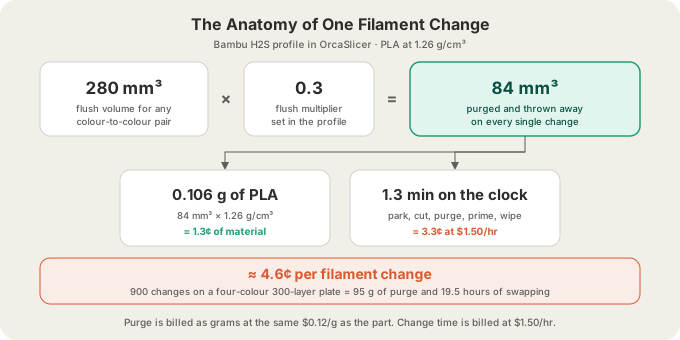
Convert the volume with PLA's density of 1.26 g/cm³ and each change is 0.106 g. At our all-in PLA rate of $0.12 per gram that is 1.3 cents of material. The change also stops the print: parking, cutting, purging, priming and wiping takes about 1.3 minutes on our machines, and we bill filament-change time at $1.50 per hour, which adds 3.3 cents. Call it 4.6 cents per change, three quarters of which is the clock rather than the plastic.
Where the Purged Plastic Physically Goes
Slicers do not simply dump 84 mm³ on the plate. They spend it in whichever of four places is least wasteful for that specific layer, in roughly this order of preference:
- Flushed into infill. If the layer contains interior lattice that will never be seen, the new colour is extruded there first. This purge is free — it was going to be printed anyway, just in a different colour, hidden inside the part.
- Flushed into supports. Same logic, on a structure destined for the bin. Both of these are why a big, dense model wastes proportionally less than a small hollow one.
- Deposited on the purge tower (also called a wipe tower). A separate block printed alongside your part, one layer at a time, that exists only to receive the flush. It ends up as a striped rectangular brick you throw away.
- Ejected. Whatever the tower and infill cannot absorb gets pushed out and dropped, which is the source of the little multi-coloured plugs that accumulate under a busy AMS machine.
The purge tower has a second, sneakier cost: plate area. It stands as tall as the tallest object on the plate and occupies a footprint next to your part for the entire print, which comes straight out of the 340 × 320 × 340 mm build volume on an H2S. A model that fits on its own may not fit with a tower beside it, and a plate packed edge to edge for a batch run may have to lose a part to make room. /blog/how-big-can-you-3d-print-build-volumes covers the rest of the usable-volume arithmetic.
One more thing worth knowing: purge is a blend of every colour that passed through it. That is not a single-material stream you can feed back into a colour-critical spool, which is why purge is genuinely discarded rather than recovered on the plate. The only real answer is to produce less of it.
How Much Waste, in Real Numbers
Here is the same object under four colour layouts: a 60 mm tall desk sign, 40 g of PLA, 0.2 mm layers, so 300 layers. The part never changes. Only the arrangement of colour does. Every multi-colour row below is a plate you painted and sliced yourself and uploaded as a .gcode.3mf, priced from the grams and hours that file reports — a model we slice for you prints in one filament, at the single-colour price.
| Colour layout | Changes | Purge | Purge vs part | Billable weight | Total |
|---|---|---|---|---|---|
| Single colour | 0 | 0 g | 0% | 40 g | $4.80 |
| 4 bands by height | 3 | 0.3 g | 1% | 41 g | $5.02 |
| 2-colour logo, 140 layers tall | 140 | 15 g | 37% | 55 g | $11.15 |
| 4 colours painted, full height | 900 | 95 g | 238% | 136 g | $45.57 |
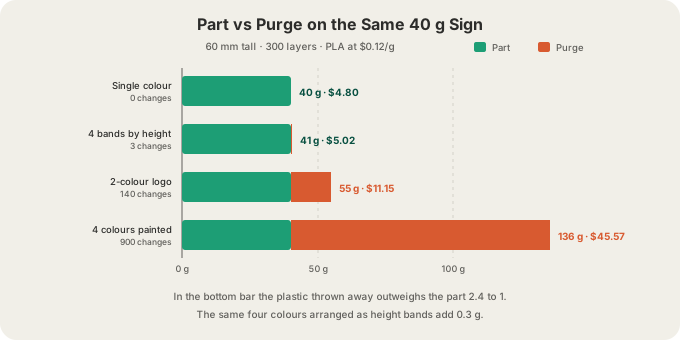
Two patterns fall out of that table. First, waste is superlinear in ambition: going from bands to a painted logo multiplies changes by 47, and going from the logo to full-height painting multiplies them again by more than six. Second, purge is charged per change while the part is charged per gram, so the ratio improves dramatically with size. Scale that sign up to 400 g and the same 900 changes still burn 95 g — now 24% of the part rather than 238%. Multi-colour hurts small parts most.
The Single Best Trick: Batch the Plate
If you need more than one of something, print them together. The change count on a plate is set by the layers, not by how many parts sit on it. Eight identical two-colour signs on one plate still change filament once per layer: the printer draws colour A across all eight parts, swaps once, draws colour B across all eight. Three hundred changes, spread over eight parts instead of one.
| One sign alone | Eight signs on one plate | |
|---|---|---|
| Part material | 40 g | 320 g |
| Filament changes | 300 | 300 |
| Purge | 32 g | 32 g |
| Billable weight | 72 g | 352 g |
| Change time at $1.50/hr | $9.75 | $9.75 |
| Order total | $18.39 | $49.39 after 5% bulk |
| Cost per sign | $18.39 | $6.17 |
Six Ways to Cut Multi-Color Waste
- Band it instead of painting it. Colours separated by height need one change each for the whole print. Colours that share layers need one change per layer.
- Shrink the painted Z range. A logo that spans 40 layers costs 40 changes; the same logo stretched over 300 costs 300. Where the artwork sits vertically is a pricing decision.
- Drop the accent colour that appears on three faces. Every extra colour that is distributed through the part adds a full set of per-layer changes, not a proportional slice of one.
- Keep some infill. A dense model absorbs flush into its own interior for free. Hollowing a multi-colour part to save 5 g of material can add 20 g of purge that no longer has anywhere useful to go.
- Batch identical parts onto one plate, as above.
- Print big colour areas as separate single-colour parts and glue or snap them together. Two 20 g halves in two colours cost $4.80 and zero purge, against $18.39 for the same object printed as one two-colour piece.
None of these are compromises on colour quality — the finished part looks the same. They are compromises on where the colour boundaries fall, which is a design decision you make once. If you are still choosing a method, /blog/three-ways-to-multi-color compares painting, per-object colours and layer swaps head to head, and /blog/3d-printing-supports-101 covers the other category of plastic you pay for and then throw away.
How We Measure and Bill Purge
Purge is not a surcharge or a line item you have to decode. It is grams, and grams are the price: the same $0.12 per gram all-in PLA rate that covers the part covers the plastic flushed out beside it, with billable weight rounded up to the whole gram and a $1.00 minimum per part. Filament-change hours are the one thing billed separately, at $1.50 per hour, because no per-gram rate can predict a plate that spends nineteen hours swapping.
Where the number comes from depends on what you upload at /print. A sliced .gcode.3mf or .gcode is the only file that reaches a machine as a multi-colour plate, and it is the cheapest one to quote: the slicer has already counted every purge and every change, so we bill those measured figures and nothing is estimated. /blog/how-to-export-sliced-file-bambu-studio shows how to produce one. Send a raw STL, GLB or 3MF and we run a real OrcaSlicer slice to measure it, but that slice is single colour — the part prints in the one filament you pick, at its one-colour weight, with no purge and no change time in the price. Painting and slicing the plate yourself is what makes the colour something the printer can execute. OBJ is not accepted at upload, so convert before you export.
After that it is the normal path: filament choice per tray is confirmed as an explicit step when the job is queued, G-code passes safety validation before it reaches a machine, live cameras cover the plate, and the printer auto-ejects into the next job. Most orders leave Austin inside 24 to 48 hours with $7 flat US shipping, free over $50, or you can pick up locally. Full rates are on /pricing.
FAQ
How much filament does a purge tower waste?
It depends entirely on the change count, not the tower. Each change sends 84 mm³ — 0.106 g of PLA — into whichever destination the slicer picks, and the tower catches whatever infill and supports cannot absorb. Three changes is a third of a gram; nine hundred changes is 95 g. If a tower on your plate looks enormous, the layout is the cause, not the tower setting.
Does multi-colour printing use more filament than single colour?
Yes, and often far more. The part itself weighs the same, but the purge is additional plastic that gets extruded, contaminated and discarded. In our worked example a 40 g single-colour sign became 136 g billable when painted in four colours across its full height. Rearranged into height bands, the same four colours added under half a gram.
Can I turn the purge tower off?
You can, but you rarely want to. Without a tower the flush has to go into infill, into supports, or straight onto the plate, and any excess ends up bleeding the old colour into the first visible lines of the new one. The result is streaky colour boundaries. Reducing the number of changes is the fix; removing the place the purge lands is not.
Is multi-colour printing worth the waste?
For a display piece, a gift, or anything where the colour is the product, usually yes — $11 for a two-colour sign against $5 for a plain one is a fair trade for something you look at every day. For functional parts, brackets and jigs it almost never is. And for anything you need in quantity, batch the plate first: sharing 300 changes across eight parts took our example from $18.39 each to $6.17 each without touching the design.
Ready to get started?
Upload a 3D model for instant pricing, or generate one with AI.