Ordering a Multi-Color Print Online: What to Check
Start with the part that catches most people out: a model we slice for you prints in the one filament you picked, whatever colors the file describes. A multi-color part has to arrive as a plate you sliced yourself, exported from Bambu Studio or OrcaSlicer as a .gcode.3mf, with the color changes already written into it. Once it does, the price is set by how many times the printer stops to change filament rather than by how much plastic your model contains — and that count is already inside the grams and hours your slicer reported, so nothing is added on top. Five things decide it, and you can check all of them before you pay: whether your file carries the color assignments at all, how the colors are laid out, whether the plate arrives already sliced, which colors are available, and what each line on the quote means. The same 40 g model can be a three-change job or a nine-hundred-change one depending on those answers.
Check 1: Does Your File Carry the Colors at All?
This is the one people get wrong most often. An STL contains triangles and nothing else. It has no notion of a filament, a tray or a color, so uploading a beautifully painted model exported as STL sends us the shape and throws the color plan away. A GLB can carry a texture, but a texture is a picture wrapped around a mesh, not an instruction telling a printer which of four trays to load at layer 214. Only two of the four formats we accept carry a real color plan.
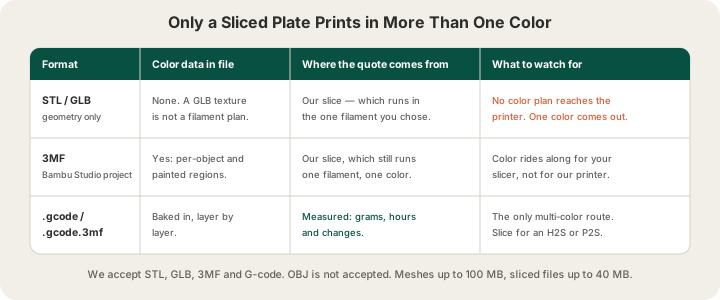
A 3MF saved out of Bambu Studio or OrcaSlicer keeps per-object filament assignments and painted regions, which is why it is the right container for carrying a color plan between slicers. If you are new to that file type, /blog/what-is-a-3mf-file explains what it stores that an STL cannot. Our own slicing does not act on that plan, though: anything we slice for you prints in the single filament you picked at upload. A sliced .gcode or .gcode.3mf is different in kind, because the tool changes are already written into it layer by layer and nothing has to be inferred. That is the one file that prints in more than one color here.
Check 2: How the Colors Are Laid Out
Our fleet is Bambu Lab H2S and P2S machines with 4-tray AMS units. An AMS is a filament changer feeding one hotend, not four hotends running at once. Every time the plate needs a different color the printer parks and cuts the current filament, loads the next, and pushes 84 mm³ of plastic through the nozzle to flush the old color out of the melt zone. That takes about 1.3 minutes and the purged plastic is waste. Your bill is essentially a count of how many times that happens.
| Color layout | Changes on a 300-layer part | Billed weight |
|---|---|---|
| Two colors, one swap at a chosen height | 1 | 41 g |
| Four colors as horizontal bands | 3 | 41 g |
| Four colors as separate objects on one plate | A few per layer they share | Varies |
| Four colors painted across the whole model | ~900 | 136 g |
Same 40 g mesh, same four spools, same layer height. The painted version costs several times the banded one because it swaps filament on nearly every layer: 900 changes purge about 95 g of plastic and add 19.5 hours of machine time on top of the print itself. /blog/three-ways-to-multi-color compares the three ways of assigning color side by side, and it is the single highest-leverage thing to read before you order.
If your design allows it, coarse color placement is dramatically cheaper than fine placement. A logo that occupies one face, a lid in a contrasting color, or a sign with its lettering raised above the plate all resolve to a handful of changes. A model with four colors marbled across its entire surface does not, and no service can make it cheap, because the cost is physics rather than markup.
Check 3: Is the Plate Already Sliced?
This is the check that decides whether you get a multi-color part at all. Upload a plain mesh or an unsliced 3MF and we slice it ourselves, and our slice puts the whole plate on one filament: the color you chose at upload. There is no color count to set on the upload page and no color surcharge on the quote, because the plate that comes off the printer is a single-color part however many colors the file described.
Upload an already-sliced file and the color plan survives, because by then it is not a plan: the tool changes are instructions in the G-code, and the operator loads the filaments the file names into the AMS trays. The measured grams, hours and change count in your G-code are what you are billed for, because the slicer has already done the real arithmetic including every purge. For a banded or per-object design that is a very large saving over a painted one, and your file is what proves which you have.
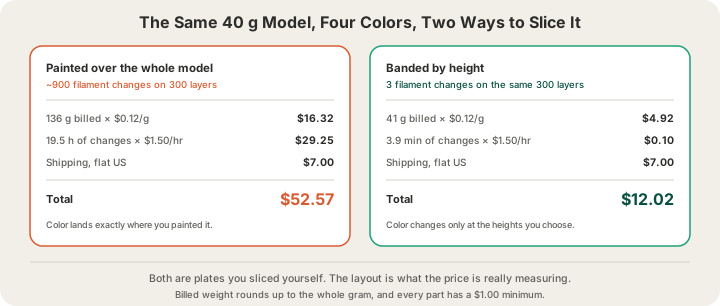
The quote breakdown on the print page shows you the split: a weight line and, on a sliced file that runs longer than its weight can explain, a machine-time line for the filament changes. If the machine-time line is larger than the weight line, your colors are painted rather than banded, and that is your cue to go back to the model.
Check 4: The Colors You Can Actually Get
Filament comes in the colors the manufacturer pigmented it, so this is a selection problem, not a mixing one. The color picker at /print lists the solid filaments we stock, and there is a custom field plus a notes box at checkout for anything else, including gradient or silk spools and specific brand matching requests. What you cannot do is hand a printer a hex code and have it mix that shade, and a screen hex will not survive the trip to plastic anyway. /blog/color-matching-filament-brand-colors covers how to run a swatch test before committing to a run.
- Four colors per plate is the hard ceiling, because the AMS has four trays.
- Different materials in different trays is possible but constrained: they have to share a nozzle temperature, so mixing PLA with ABS on one plate is not a good idea.
- Colors printed side by side always show a little bleed at the boundary; a change is a flush, not a hard cut, and the first millimetres after one carry a trace of the previous color.
- Dark to light transitions bleed the most. Sequencing light colors before dark ones helps.
Check 5: Read the Line Items Before You Pay
Our pricing is all-in per gram, meaning the rate already contains filament and normal machine time. There is no separate setup fee and no per-color fee. What can appear on a quote is this:
| Line | What it is | When it appears |
|---|---|---|
| Weight × rate | The all-in per-gram charge, rounded up to the whole gram | Always |
| Machine time | $1.50/hr for the hours weight cannot explain | Sliced files that run long for their weight |
| Quality factor | 0.1 mm premium layers price at 1.75× the rate | If you choose premium |
| Bulk discount | 5% off at 5+ units, 10% off at 10+ | Quantity orders |
| Shipping | $7 flat US, free over $50 | At checkout |
The per-gram rate depends on material, and there is a $1.00 minimum per part so trinket-sized orders do not price below what they cost to handle. Full details live on /pricing.
| Material | All-in rate | Typical use in a color job |
|---|---|---|
| PLA | $0.12/g | Almost every multi-color print |
| PETG | $0.12/g | Outdoor signage, tougher parts |
| ABS | $0.12/g | Heat resistance |
| TPU | $0.13/g | Flexible parts, rarely multi-color |
| ASA | $0.14/g | UV-stable outdoor color |
The Checks We Run on Our Side
Before anything reaches a printer, your file goes through validation. Meshes get a server-side review for the defects that turn into failed prints. Sliced files get a G-code safety validation, which is also the reason a file sliced for a machine we do not run gets rejected rather than quietly printed: the plate, nozzle and temperature commands have to match a Bambu H2S or P2S. Size is checked against our 340 × 320 × 340 mm build volume, so a model that would collide with the gantry is caught at upload rather than at 3 a.m.
After that it is the normal farm pipeline. Jobs queue onto a free machine, print under a live camera, and move through stages you can watch on your order page: placed, printed, packed, shipped, delivered. Most orders print within 24 to 48 hours from Austin, Texas, and multi-color jobs are the main exception, because a plate with 19.5 hours of tool changes in it simply takes longer to run than one without.
FAQ
Why is my multi-color quote so much higher than the single-color one?
Because of filament changes, not because of color. Each change purges 84 mm³ of plastic and takes about 1.3 minutes, and a model painted in four colors over its full height can need around 900 of them. In the sliced file you send us that turns a 40 g part into 136 g of billable plastic and adds 19.5 hours of machine time, billed at $1.50/hr. The same four colors arranged as horizontal bands need three changes, and the quote barely moves off the single-color price.
Do I have to slice the file myself to order a multi-color print?
Yes. A mesh or a 3MF we slice for you prints in the one filament you chose, whatever color data the file holds, so the multi-color version has to arrive as a plate you sliced: paint or band it in Bambu Studio or OrcaSlicer and upload the .gcode.3mf. The quote then uses your slicer's measured grams and hours, which for a banded design is barely more than the single-color price.
How many colors can one print use?
Four per plate, matching the four trays on our AMS units. If your design needs more than four, the usual answers are to split it into separate parts that assemble, or to print the extra detail as a separate insert.
Can I ask for a color that is not in the picker?
Yes. Use the custom field next to the swatches and add a note in the special instructions box at checkout describing what you want, including gradient or silk spools and any brand reference. We will tell you what we can source and how close it lands before the job runs.
Ready to get started?
Upload a 3D model for instant pricing, or generate one with AI.