Reserving a 3D Printer by the Hour
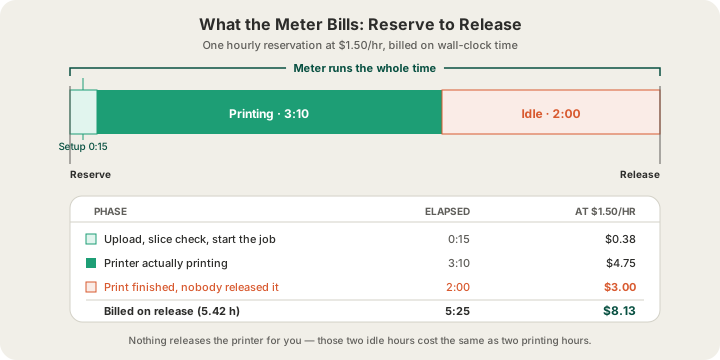
Reserving a 3D printer by the hour means taking one machine out of a shared fleet and having it dedicated to you until you give it back. On our farm that costs $1.50 an hour, metered on real elapsed time from the moment you reserve to the moment you release, with a card on file instead of a payment up front. You are renting the machine, not a print: the clock does not care whether the printer is laying down a first layer or sitting idle because you went to lunch.
That single sentence is the whole difference between a reservation and an order. When you upload a part at /print, you pay for the part — $0.12 per gram all-in for PLA, $1.00 minimum, and somebody else worries about which printer runs it. When you reserve, you pay for time, and the responsibility for using that time well moves to you. Here is exactly how the meter behaves, where the daily rate takes over, and what to have ready before you start it.
What an Hourly Reservation Actually Buys
A reserved printer leaves the general queue. Its status flips from Available to Reserved, the scheduler stops handing it work from the shared order stream, and it shows up in your dashboard as a machine with your name on it. Jobs you upload go to that printer instead of competing for whichever machine frees up first, and they run in the order you start them.
The practical value is not price — it is control and continuity. The four AMS trays stay loaded with the filament you picked for the whole reservation, so ten iterations of the same bracket come out of the same spools in the same colours instead of whatever was mounted that day. You can start a job, watch the plate on the live camera, decide at layer 30 that the orientation is wrong, cancel, re-slice, and start again without placing a new order each time. /blog/what-is-remote-3d-printing covers how that compares to remote-controlling a machine you own, and /blog/what-is-a-3d-print-farm explains what the rest of the fleet is doing while yours is parked.
The Three Duration Modes
The reservation flow asks for a duration before it asks for anything else. There are three choices, and they differ less than the labels suggest — two of them meter identically and only the third changes the arithmetic.
| Mode | Rate | How it bills | Pick it when |
|---|---|---|---|
| Hourly | $1.50/hr | Metered reserve → release | You have a specific plate to run, 1–24 hours |
| Daily | $15.00/day | Per started 24-hour day | You will hold the machine longer than 10 hours |
| Open-ended | $1.50/hr | Metered until you release it | You do not know yet how long you need |
The number of hours you choose in hourly mode is a plan, not a purchase. Hourly reservations accept 1 to 24 hours, and that figure exists so the review screen can show you an expected total. Nothing pre-buys those hours, nothing stops you at the end of them, and nothing refunds you for finishing early — the charge is computed on release from the actual elapsed time, rounded to the nearest hundredth of an hour. Reserve for four hours, release after 97 minutes, and you are billed 1.62 hours, which is $2.43.
Hourly vs Daily: the Break-Even Is Ten Hours
$15.00 a day divided by $1.50 an hour is ten. That is the entire decision. Below ten hours of wall-clock time, hourly is cheaper. Above ten hours, the daily rate is, and it keeps getting cheaper the longer you hold the machine, because a full 24-hour day still costs $15.00 while the same 24 hours metered hourly costs $36.00.
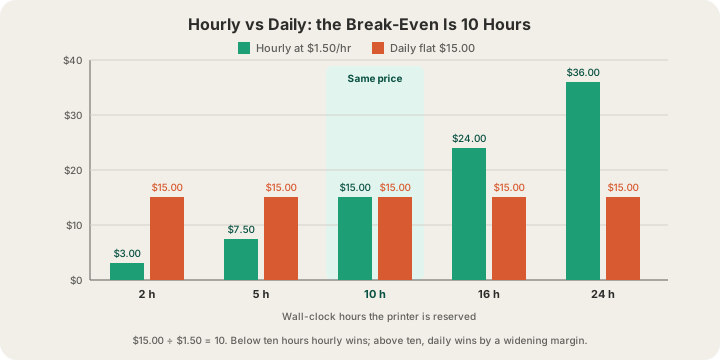
This matters more than it looks, because most people underestimate wall-clock time badly. A plate that slices to six hours of printing is not a six-hour reservation: add the time to upload and start it, the cooldown before the plate can be cleared, and the gap between the print finishing at 2 a.m. and you noticing at 8 a.m. That six-hour print is a fourteen-hour reservation, which is $21.00 hourly and $15.00 daily. If a print will be running while you are asleep, you are almost certainly in daily territory. /blog/how-long-does-3d-printing-take has realistic durations for common part sizes if you are estimating from scratch.
How the Meter Works, Step by Step
- You need a card on file before you can reserve. Not a deposit or a hold — the reservation flow simply refuses to start without one, because time accrues rather than being paid for in advance.
- The clock starts the instant the printer is claimed, not when your first job starts printing. Uploading, slicing decisions and second thoughts are all billable.
- The running total is visible on the printer's page while the reservation is live, updating as you watch, so you never have to guess what you have spent so far.
- The clock stops when you release the printer. Nothing releases it for you — there is no timer that hands the machine back at the end of the hours you picked.
- On release, elapsed time is rounded to two decimal places and multiplied by the rate. The charge accrues to your monthly balance rather than hitting the card immediately.
- Balances settle automatically on the 1st of each month, and dust balances under $0.50 are skipped rather than charged.
Ten Minutes of Prep That Pays for Itself
Everything below can be done before the meter starts, and every item on it is something people routinely discover after it has. At $1.50 an hour none of this is ruinous, but a reservation that starts with a fit failure and a re-export has burned twenty minutes on housekeeping.
- Have your files in an accepted format. We take STL, GLB, 3MF and G-code (.gcode or .gcode.3mf). OBJ is not accepted, so convert it before the clock starts rather than after.
- Check the part fits. The build volume is 340 × 320 × 340 mm on the H2S. A model that is 2 mm too tall is better discovered on your own time.
- Decide the filament before you start. The trays are loaded for the reservation, so knowing you want four colours of PLA rather than one of PETG saves a swap mid-session.
- Watch the file size limits: meshes cap at 100 MB, sliced files at 40 MB. A decimation pass on a scanned mesh is not something to do with a machine ticking.
- Sanity-check the slice. If you are bringing your own G-code, it still passes safety validation before it is allowed to run, and a file that fails that check fails it on your clock.
What You Can Do While the Clock Runs
A reserved printer is not a black box you feed files into. The dashboard gives you the same view an operator has, which is the reason a reservation is worth more than a queue slot:
- A live camera on the plate, so you can check adhesion at layer three instead of finding out at hour six.
- Live telemetry — nozzle, bed and chamber temperature, current layer against total layers, and estimated time remaining — refreshed every few seconds.
- AMS tray levels for all four trays, so a spool about to run out is visible before it does.
- Start, cancel and eject controls, plus lowering the bed to present a finished part.
- A request for a manual bed clean when something needs a human in the room, which is the part of remote printing a machine at home genuinely cannot do.
When Not to Reserve
Most work should not be a reservation. If you want one part, or fifty copies of one part, uploading it at /print is cheaper and less effort: you pay $0.12 a gram all-in for PLA with a $1.00 minimum per part, $7 flat US shipping, and no clock at all. The farm decides which printer runs it, an operator handles any failure, and the difference between a good and bad estimate of print duration costs you nothing. /pricing has the full rate card, and /blog/how-much-does-custom-3d-printing-cost works through complete examples.
Reserve when the thing you need is the machine rather than the part: an iteration loop where you want to see a change printed and immediately print the next version, a run that must come off identical hardware with identical spools, or a batch you want to steer yourself. Everything else is an order.
FAQ
How much does it cost to rent a 3D printer by the hour?
On our farm, $1.50 per hour, metered from when you reserve the printer to when you release it. A daily reservation is $15.00 per started 24-hour day, which works out cheaper than hourly once you hold the machine for more than ten hours. Filament your jobs consume is billed on top, at raw material cost — $0.02 a gram for PLA, $0.025 for PETG, $0.03 for ABS. That is deliberately not the $0.12 all-in rate a /print order pays: on a reservation you are already renting the machine by the hour, so charging the all-in rate would bill you for machine time twice.
Does the reservation end automatically after the hours I picked?
No, and this is the single most expensive misunderstanding available. The hours you choose are an estimate shown on the review screen; the actual charge comes from real elapsed time when you release the printer. Nothing hands the machine back for you, so a reservation left open overnight meters overnight.
Do I pay up front to reserve a printer?
No. You need a card on file before the reservation will start, but nothing is charged at that moment. Time accrues to a monthly balance along with any prints you ran, and that balance is charged automatically on the 1st of the following month. Balances under $0.50 are skipped rather than charged.
Is reserving a printer cheaper than ordering the parts?
Usually not, and it is not meant to be. Per-part ordering at $0.12 per gram is the efficient path for a fixed set of models. A reservation is worth paying for when you need the machine itself — same printer, same four trays, jobs starting the moment you decide to start them — rather than when you need the cheapest possible part.
Ready to get started?
Upload a 3D model for instant pricing, or generate one with AI.