Watching Your Print Live: Why Farms Stream Cameras
Print farms stream live cameras because a progress bar cannot tell you whether the part still exists. A printer that lost its object off the plate at layer 40 reports the same healthy numbers as one printing perfectly: correct temperatures, layers climbing, time remaining counting down. The camera is the only cheap way to answer the question that actually matters, which is whether there is still something on the plate worth waiting for.
On our farm every printer has one, and the stream is treated as infrastructure rather than a nice extra. This is what it is made of, what it is good at, what it is bad at, and how to read one without staring at it for six hours.
Why a Camera Beats a Progress Bar
An FDM printer is an open-loop machine. It executes G-code — move here, extrude this much — and it has no idea whether the plastic it just pushed out landed where it was supposed to. Detach a part from the build plate and the nozzle keeps tracing the same toolpath faithfully in mid-air, at the same temperature, on schedule, for hours.
So the failures a farm cares most about are precisely the ones telemetry is blind to. Warping at a corner, a first layer that never bonded, a knocked-over part, the bird's nest that follows: all of them look like a perfectly normal print to every sensor the machine has. Meanwhile the failures the machine can detect — an empty AMS tray, a clogged nozzle throwing an HMS code, a thermal runaway — are already handled without anybody watching. The camera exists for the other half.
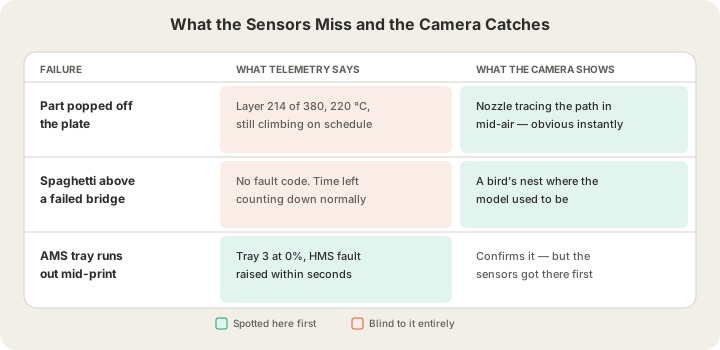
The second reason is cheaper to explain: a camera turns a six-hour wait into a five-second check. A customer who can glance at a plate does not have to email and ask, and an operator who can see the plate does not have to walk over to it. On a fleet, that is the difference between one person supervising four machines and one person supervising forty. /blog/what-is-a-3d-print-farm covers the rest of that automation loop.
What Is Actually Being Streamed
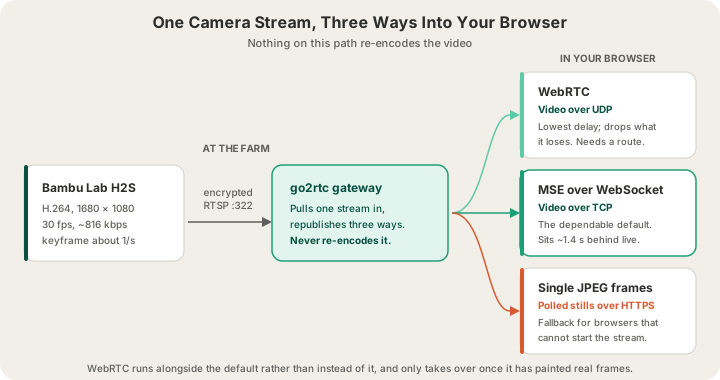
The camera inside a Bambu Lab H2S is not a webcam you can plug into a laptop. It publishes an encrypted RTSP stream on the printer's own network — H.264 video, 1680 × 1080, 30 frames a second, at roughly 816 kbps with a keyframe about once a second. That stream is available to anything on the LAN that has the printer's access code, and to nothing else.
Getting it to a browser halfway across the country is a gateway problem. Ours runs go2rtc on the box that sits with the printers: it pulls the RTSP stream in, and republishes it in the shapes browsers can actually consume. The important property is that it never re-encodes the video. Transcoding thirty streams of 1080p would flatten any small machine; repackaging the same H.264 bytes into a different container costs almost nothing, and the viewer's GPU does the decoding.
| Path | Carries video over | Behaviour | Used when |
|---|---|---|---|
| WebRTC | UDP | Lowest delay; drops lost packets rather than waiting | A direct route to the gateway exists |
| MSE over WebSocket | TCP | Reliable; a lost packet stalls until it is resent | The dependable default, everywhere |
| Single JPEG frames | HTTPS | Still images, polled; no motion, no buffer | MSE cannot start in that browser |
All three run against the same source. WebRTC is attempted alongside the WebSocket stream rather than instead of it, and only takes over once it has genuinely painted frames — a peer that connects and then delivers nothing would otherwise leave you staring at black while a perfectly good stream was thrown away. If the route never materialises, nothing visibly changes.
Staying Near Live Without the Stutter
A live stream always drifts. Fragments arrive in bursts, a backgrounded tab gets throttled, a retransmit stalls the socket, and the picture slides further behind real time. The obvious fix — jump to the newest frame whenever drift crosses a threshold — is what makes most print cameras feel broken: the image falls a couple of seconds behind, snaps forward, and repeats. Nothing is actually wrong, but every snap reads as a glitch.
Our player converges on live by playing slightly fast instead. It aims to sit about 1.4 seconds behind the edge of the buffer, and when drift passes 2.2 seconds it raises playback to 1.07× until the gap closes, absorbing a second of lag over roughly fifteen seconds. There is no audio on a print camera, so nothing pitch-shifts and the speed-up is invisible. Seeking is kept only for gaps too large to walk off — beyond about eight seconds, which means a tab that was asleep — where catching up gradually would take minutes.
The Numbers Beside the Picture
Video answers 'is it still there'. It is terrible at 'how long left' and 'is the nozzle at temperature', so the camera sits next to a telemetry feed that pushes a fresh snapshot of every printer roughly every five seconds:
- Nozzle, bed and chamber temperature, so a heater that is not holding is obvious before the layer it ruins.
- Current layer against total layers, which is a far better progress signal than a percentage.
- Estimated time remaining, straight from the machine rather than from the original slice.
- All four AMS trays with their remaining levels, so a spool about to run out is visible before it does.
- Any faults the printer is reporting right now, including HMS codes — /blog/ams-errors-decoded translates the common multi-colour ones into plain English.
What to Actually Look For
Watching a whole print is a poor use of a life. Three checks catch nearly everything:
- The first layer. Look for lines that are squished together with no gaps and no curling at the corners. Nearly every catastrophic failure starts here, and it is over within a few minutes of the job starting.
- The first overhang or bridge. If supports were going to be needed and are not there, this is exactly where it shows: strands drooping into open air instead of spanning it.
- Anything tall, around a third of the way up. Tall thin parts are where knock-offs and layer shifts happen, because that is when the toolhead has enough leverage to matter.
Between those, glance rather than stare. A print that looked right at layer 3 and right at layer 100 is very unlikely to have gone wrong at layer 60 without you finding a bird's nest waiting at the end. And if it did, that is what an operator and a reprint are for.
Who Gets to Watch
There are two ways to see a plate on our farm, and they are deliberately different. If you order a part at /print, you do not get a camera — you get order stages (placed, printed, packed, shipped, delivered) and a part that has been inspected before it ships, because your model is one of several on a plate that is not yours to watch. Uploading a file and letting the farm handle everything is the point of that route; /blog/what-happens-after-you-click-print follows an order through it end to end.
If you reserve a printer at /farm, the machine is yours for the duration and so is its camera, alongside its job queue, telemetry and controls. That is the specific thing a reservation buys that a per-part order does not, and /blog/what-is-remote-3d-printing compares it to remote-controlling a printer you own — where you get the same eyes and the same stop button, but nobody in the room to clear the plate.
FAQ
Can I watch my 3D print remotely?
On a reserved printer, yes: every machine in our fleet streams a live camera to the dashboard, alongside temperatures, layer count and time remaining. For a standard per-part order at /print you get order stages and inspection instead, because the plate your model is on will usually be carrying other customers' parts too.
Why does the print camera look slightly delayed?
Because it is, by design — about a second and a half. Video arrives in bursts rather than smoothly, and a player that sits right at the edge of the buffer runs dry between bursts and stutters. Holding a small cushion and gently catching up when it drifts gives a picture that never hitches, at the cost of a delay nobody watching a 3D print will ever notice.
Does streaming the camera slow the printer down?
No. The camera is a separate encoder inside the printer, publishing its stream whether or not anybody is watching, and the gateway repackages that video without re-encoding it. No print-side computation is added by a viewer opening the page, and nothing about the toolpath changes.
What should I do if I see my print failing?
On a reserved printer, cancel it from the dashboard rather than letting it finish — a failed print still consumes filament and still meters machine time. Then check the usual suspects before restarting: plate adhesion, missing supports, and orientation. If a plate needs clearing before the next attempt, request a bed clean and an operator will handle it.
Ready to get started?
Upload a 3D model for instant pricing, or generate one with AI.