What Is a 3MF File? Why It Beats STL
A 3MF file (.3mf, short for 3D Manufacturing Format) is a compressed container that stores a 3D model along with everything a printer needs to build it: the mesh, the scale in millimetres, colour and material assignments, where each part sits on the build plate, and — in a sliced export — the toolpaths themselves. An STL stores exactly one thing, a loose pile of triangles, and leaves every other decision to be reconstructed by hand downstream. That single difference is why 3MF beats STL for nearly every modern print job, and it is why we accept .3mf uploads at /print alongside STL, GLB and raw G-code.
What Is a 3MF File, Exactly?
3MF is an open, royalty-free format maintained by the 3MF Consortium, designed from the start for manufacturing rather than for computer graphics. Where STL came out of stereolithography in the 1980s and OBJ came out of animation, 3MF was written by people whose actual problem was getting a design from CAD to a machine without losing information on the way.
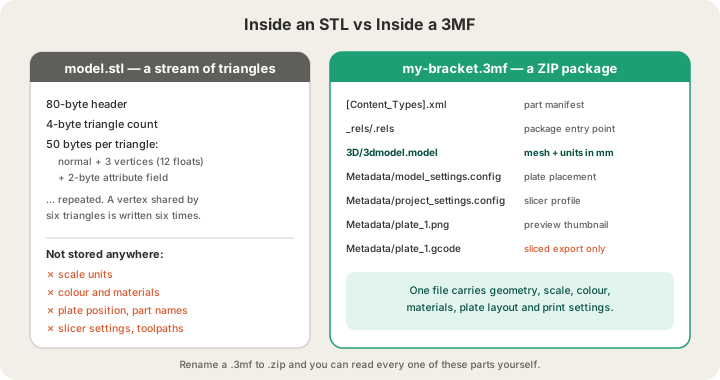
Mechanically, a .3mf is a ZIP archive built on the Open Packaging Conventions — the same packaging idea behind .docx and .xlsx. Rename any 3MF to .zip, unzip it, and you get a small tree of XML documents and assets. Nothing about it is proprietary or hidden, which is a large part of why slicer vendors adopted it so quickly.
my-bracket.3mf              (a ZIP archive — rename to .zip and open it)
├── [Content_Types].xml      declares what each part in the package is
├── _rels/.rels              the package entry point
├── 3D/
│   └── 3dmodel.model        the mesh, in XML, with unit="millimeter"
└── Metadata/
    ├── model_settings.config    per-object settings and plate placement
    ├── project_settings.config  the full slicer profile
    ├── plate_1.png              build-plate thumbnail
    └── plate_1.gcode            toolpaths — only in a sliced export
The important line is 3D/3dmodel.model. It holds a single shared vertex list plus a list of triangles that index into it, wrapped in an XML element that states its units outright. A slicer opening that file does not have to guess anything.
3MF vs STL: What Survives the Handoff
The clearest way to compare the two is to ask what information still exists after you hand the file to somebody else. Everything an STL cannot carry is information you end up re-entering in a slicer, or writing in an email, or getting wrong.
| What you designed | STL | 3MF |
|---|---|---|
| Triangle geometry | Yes | Yes |
| Scale units (mm vs inches) | No | Yes, declared explicitly |
| Colour per object or per face | No | Yes |
| Material / filament assignment | No | Yes |
| Build-plate position and rotation | No | Yes |
| Several separate parts in one file | No, one shell soup | Yes, named objects |
| Slicer settings and toolpaths | No | Yes, in a sliced export |
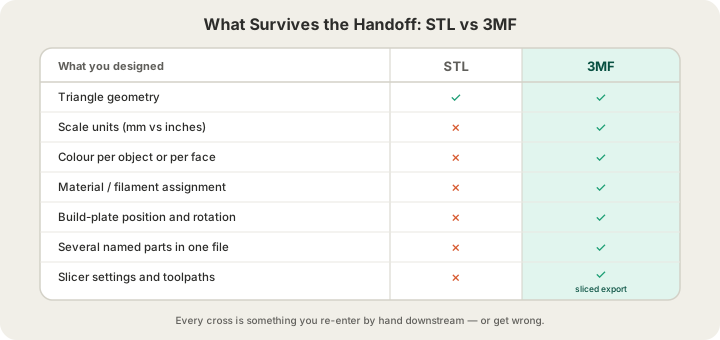
The units row is the one that costs people real money. An STL has no unit field at all, so a model exported from CAD in inches and opened in a slicer that assumes millimetres arrives 25.4 times too small, and the reverse arrives 25.4 times too large. We cover that failure and the other format tradeoffs in our guide to /blog/stl-vs-obj-vs-3mf-vs-step-export-formats-explained. A 3MF cannot make that mistake, because unit="millimeter" is written into the model document.
Why 3MF Files Are Usually Smaller Too
Binary STL is a fixed-width format: an 80-byte header, a 4-byte triangle count, then 50 bytes per triangle — twelve 32-bit floats for the normal and three vertices, plus a 2-byte attribute field. There is no vertex sharing anywhere in the spec. A vertex where six triangles meet is written out six separate times, at full float precision, with no relationship between the copies recorded.
3MF stores each vertex once and refers to it by index, then deflates the whole XML package with ordinary ZIP compression. The same mesh therefore lands as a substantially smaller file, and the smaller file carries more information. Upload size limits stop being the constraint they are with dense STL exports, which matters when a scanned or AI-generated mesh runs into millions of triangles.
The Two Different Things People Call a 3MF
This trips up more uploads than any other detail on this page. Bambu Studio and OrcaSlicer both write .3mf files, but they write two different kinds, and only one of them contains toolpaths.
| Project 3MF | Sliced 3MF (.gcode.3mf) | |
|---|---|---|
| How you make it | File → Save Project | Slice, then Export plate sliced file |
| Contains the mesh | Yes | Yes |
| Contains toolpaths | No | Yes, as Metadata/plate_N.gcode |
| Knows filament grams and time | No | Yes, written by the slicer |
| Good for | Reopening your own work | Sending a job to a print farm |
Our uploader treats a .3mf as a sliced bundle: it opens the archive, finds the plate G-code inside, and reads the filament weight and estimated time the slicer already calculated. Send a plain project save and you will get a specific error telling you to slice the plate and use Export plate sliced file instead. If that step is unfamiliar, our walkthrough on /blog/how-to-export-sliced-file-bambu-studio takes four minutes.
3MF and Multi-Colour Printing
Colour is where 3MF stops being a nicety and becomes the only sensible option. Our machines run a 4-tray AMS, so a single job can pull four filaments without anyone touching the printer. Assigning those four colours to specific objects or specific painted faces is something an STL simply cannot express — you would have to send four separate STLs and a diagram explaining how they fit together. A 3MF carries the assignment in the file. What it cannot do is make our slicer act on it: a mesh we slice for you prints in the single filament you chose. The assignment matters because it survives the trip to the slicer where you paint and slice the plate yourself.
Multi-colour is not free, and a sliced 3MF is what lets us quote it honestly. Every filament change purges the old colour out of the hotend — 84 mm³ per change on Bambu's own H2S profile — and stalls the machine about 1.3 minutes. Because a .gcode.3mf already knows how many changes the plate needs, its measured grams and hours are the quote, with no colour surcharge added on top. Full rate details live on /pricing.
What Happens to Your 3MF on Our Farm
- The archive is checked for safety before anything is read — entry count, uncompressed size and compression ratio all have ceilings, because a hostile ZIP can be small on disk and enormous in memory.
- The plate G-code is pulled out and parsed for filament grams, estimated time, footprint and maximum Z height.
- The embedded plate thumbnail becomes the preview you see on the print page, so you can confirm at a glance that the right plate got uploaded.
- The G-code passes safety validation before it is ever queued to a machine, alongside the live camera feeds and auto-eject that let the farm run unattended.
- You are quoted on billable weight: $0.12 per gram all-in for PLA, rounded up to the whole gram, with a $1.00 minimum per part.
- The job joins the queue in Austin, Texas. Most orders print within 24 to 48 hours and ship for a $7 flat US rate, free over $50.
One consequence worth knowing: because a sliced 3MF already contains your slicer's decisions, uploading one means you choose the layer height, infill, wall count and support strategy, not us. That is exactly what experienced users want. If you would rather we made those calls, upload the raw mesh instead and we will slice it in OrcaSlicer, after the mesh review described in /blog/why-print-ready-matters-mesh-validation.
When to Send Something Other Than a 3MF
- STL — the safest universal mesh. Send this when your tool cannot write 3MF, or when you want us to pick the print settings. Limit 100 MB.
- GLB — good for AI-generated and textured models, since it keeps colour in one binary file. Limit 100 MB.
- Plain .gcode — a sliced file with no wrapper. Accepted, but it carries no thumbnail, so the preview is blank.
- OBJ — not accepted. Export STL or 3MF from the same program instead; almost every tool that writes OBJ writes at least one of them.
How to Export a 3MF
- Bambu Studio / OrcaSlicer: arrange the plate, slice it, then File → Export → Export plate sliced file. This is the one to send us.
- Fusion 360: right-click the body or component, Save As Mesh, and choose 3MF as the format.
- Blender: File → Export → 3MF, available through the 3MF add-on. Set the scene unit to millimetres first.
- Tinkercad and most browser CAD: export STL or GLB and upload that — both are accepted, and we will slice for you.
FAQ
How do I open a 3MF file?
Any modern slicer opens one directly: Bambu Studio, OrcaSlicer, PrusaSlicer and Cura all read 3MF. To inspect the contents rather than print them, copy the file, rename the copy to .zip, and unzip it — you will find 3D/3dmodel.model and a Metadata folder. Windows also previews 3MF in the built-in 3D Viewer.
Is 3MF better than STL for 3D printing?
For printing, yes, in almost every case. It records scale units so nothing arrives 25.4 times wrong, keeps colour and material assignments, preserves plate layout, holds multiple named parts in one file, and compresses smaller. STL is still worth keeping around for old software and for the moments when you want a service to make the print decisions for you.
Why did my 3MF upload get rejected?
Almost always because it was a project save rather than a sliced export, so there was no G-code inside for us to read grams and time from. Reopen it in Bambu Studio or OrcaSlicer, slice the plate, and use Export plate sliced file. The other common cause is size: sliced files are limited to 40 MB, so split a multi-plate project into one export per plate.
Does uploading a 3MF change what I pay?
It changes how precisely we can price it, not the rate. PLA is $0.12 per gram all-in either way, with a $1.00 minimum and weight rounded up to the whole gram. A sliced 3MF gives us the slicer's own filament figure immediately, including supports and purge waste, so the quote you see is the quote you pay.
Ready to get started?
Upload a 3D model for instant pricing, or generate one with AI.