What Is Remote 3D Printing? Reserve a Printer From Your Couch
Remote 3D printing is running a printer you are not standing next to. In practice it takes three forms: controlling a machine you own over the internet, sending a one-off job to a print service, or reserving a printer inside somebody else's farm and driving it yourself for an hour, a day, or as long as you keep it. The third is the one most people have not tried, and it is the one that behaves most like owning a printer without owning anything: you pick the filament, you queue the jobs, you watch the plate on a live camera, and the finished parts either ship to you or wait for pickup in Austin.
What Remote 3D Printing Actually Means
The phrase gets used for two quite different things, and the difference matters because it decides who is responsible when something goes wrong.
The first meaning is remote control: your printer is at home, you are not, and an app lets you start a job, watch a camera and stop a print. Bambu Handy over LAN mode does this well. What it cannot do is put filament back on a spool, unstick a warped corner, or clear a plate so the next job can start. Remote control gives you eyes and a stop button, not hands.
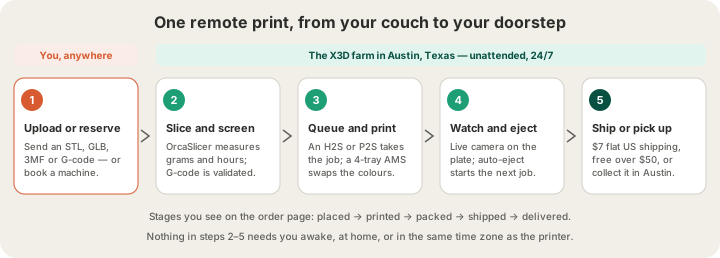
The second meaning is remote production: the machines are somewhere else entirely, and so is the labour. You are not operating hardware, you are placing work into a system that already runs 24/7. That system slices, schedules, prints, inspects, ejects and packs, and the only thing you own is the file and the result. A print farm is what that system looks like from the inside, which /blog/what-is-a-3d-print-farm covers end to end.
Three Kinds of Remote, Compared
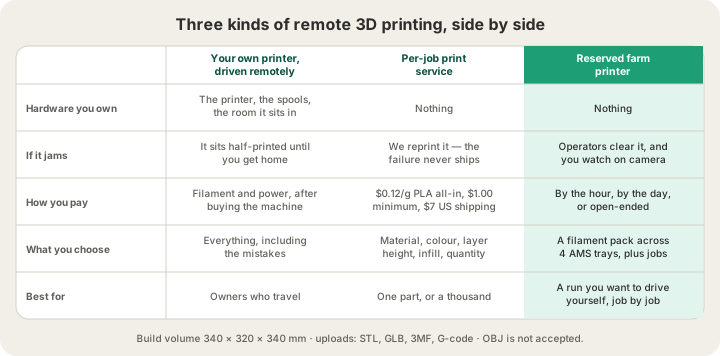
| Remote control | Per-job service | Reserved farm printer | |
|---|---|---|---|
| Machine is | Yours, at home | Theirs, invisible to you | Theirs, assigned to you |
| You submit | Sliced G-code | A model or G-code | As many jobs as you like |
| Failure recovery | You, when you get back | The farm reprints it | Operators, on camera |
| Cost model | Filament and power | $0.12/g PLA all-in | Hourly, daily, or open-ended |
| Good for | Travelling owners | One part or a thousand | A run you want to steer |
A per-job service is the right default for most work. You upload once, we quote from a real slice, and the part arrives. The reserved-printer model earns its keep when you have a batch of related jobs and want them to land on the same machine with the same four colours loaded, without re-uploading a new order for every iteration.
How Reserving a Printer Works
The reservation flow at /farm is three steps, and none of them involve talking to anyone.
- Pick a filament pack. Each pack is four colours, one per AMS tray, in a single material: a PLA pack of white, black, grey and red, a PLA pack of red, blue, yellow and green, a PETG pack, and so on. That choice is what the machine will have loaded for the whole reservation.
- Pick a duration. Hourly if you have a specific plate to run, daily if you are working through a batch, or open-ended if you want to hold the machine until you release it.
- Launch. The printer becomes yours, appears in your dashboard with its live camera and job queue, and bills to the card on file rather than asking for payment up front.
From there it behaves like a machine on your desk that someone else cleans. You upload jobs, they queue on your printer instead of competing with the general fleet, and you can see the plate at any time. When a job finishes, auto-eject clears the plate and the next one starts, which is the specific thing remote-controlling your own printer can never do.
What Makes an Unattended Print Safe
The reason remote printing is nerve-wracking on a machine at home is that nobody is there. A farm answers that with four things, and they are worth knowing about because they are what you are actually buying.
- G-code safety validation. Sliced uploads are screened before they are allowed to run, because a G-code file is a list of commands, not a shape, and an unvetted one can drive a machine somewhere it should not go.
- Fit checking against the real plate. Our largest build volume is 340 × 320 × 340 mm on the H2S, and a model that does not fit is caught at upload rather than at hour six.
- Live cameras. Every printer streams, so a plate you are worried about is one click away no matter what time zone you are in.
- Operators and auto-eject. Failures get cleared and requeued by people who are already in the room, and finished plates eject on their own so the machine does not idle overnight.
Remote Printing Without a Browser
The most remote version of remote printing is code. Our REST API takes a file and a shipping address and returns an order code, a measured breakdown and a status URL, so a print can be triggered by a form submission, a cron job, or a build pipeline with nobody in the loop at all.
curl -X POST https://x3dstudios.com/api/print/orders \
  -H "Authorization: Bearer $X3D_API_KEY" \
  -F [email protected] \
  -F material=pla \
  -F quantity=5 \
  -F recipientName="Receiving Dock" \
  -F street1="100 Congress Ave" -F city=Austin -F state=TX -F zip=78701

# → { "code": "X3D-ABCD2345", "status": "RECEIVED", "charged": 16.12,
#     "breakdown": { "print": 9.12, "shipping": 7, "grams": 16 } }
#
# grams is per unit: 16 g x $0.12 x 5 brackets, less the 5% bulk
# discount for 5+, plus $7 flat US shipping.
You then poll the same order code for status as it moves through received, accepted, printing, printed, shipped and delivered. Full field reference is at /api-docs, and /blog/3d-printing-api-manufacturing-as-code covers the design patterns that make this useful rather than just clever.
What You Give Up
Two things, honestly. The first is the tinkering loop: if you want to nudge a flow rate mid-print or crack the enclosure open to see what a stringing problem looks like up close, you need a machine you can touch. The second is shipping latency. A part printed remotely still has to travel, and $7 flat US shipping buys you a carrier, not teleportation. Austin pickup removes that for local customers, and for genuinely urgent work /blog/rapid-prototyping-48-hours lays out what a realistic fast turnaround looks like.
What you get back is everything that is boring about owning a printer: no nozzle changes, no dried filament, no bed levelling, no 3 a.m. failure discovered at 8 a.m., and a fleet that scales past what one machine can do. If you have never printed anything at all, /blog/how-to-3d-print-without-owning-a-printer is the shorter starting point.
FAQ
What is remote 3D printing?
Running a 3D printer you are not physically at. That covers controlling your own machine over the internet, sending a job to an online print service, and reserving a printer inside a print farm to use as your own for a set period. All three start in a browser; only the last two include somebody else handling the hardware.
Can you rent a 3D printer online?
Yes. At /farm you reserve a machine from our fleet by choosing a filament pack for its four AMS trays and a duration: hourly, daily, or open-ended. The printer is then dedicated to your jobs, with a live camera and its own queue, and the reservation bills to the card on file instead of asking for payment before you start.
Is it safe to run a 3D print while nobody is watching?
On a farm, yes, because somebody is: printers stream live video, sliced G-code passes a safety validation step before it can run, models are checked against the real 340 × 320 × 340 mm build volume, and operators clear and requeue failures. On a machine at home with nobody in the building, unattended printing is a risk you are personally carrying.
Do I need to slice the file myself?
No. Send an STL, GLB or 3MF and we slice it in OrcaSlicer with the profile the printer will actually use, which is where the quoted grams and hours come from. If you prefer your own settings, upload sliced G-code instead and we run it as-is after the safety check. OBJ is not accepted in either case.
Ready to get started?
Upload a 3D model for instant pricing, or generate one with AI.